
Hexagon Area Calculation: Construction via Rotation and Mirror
Loading the math board and drawing, please wait…
In collections
geometriadinamica.es
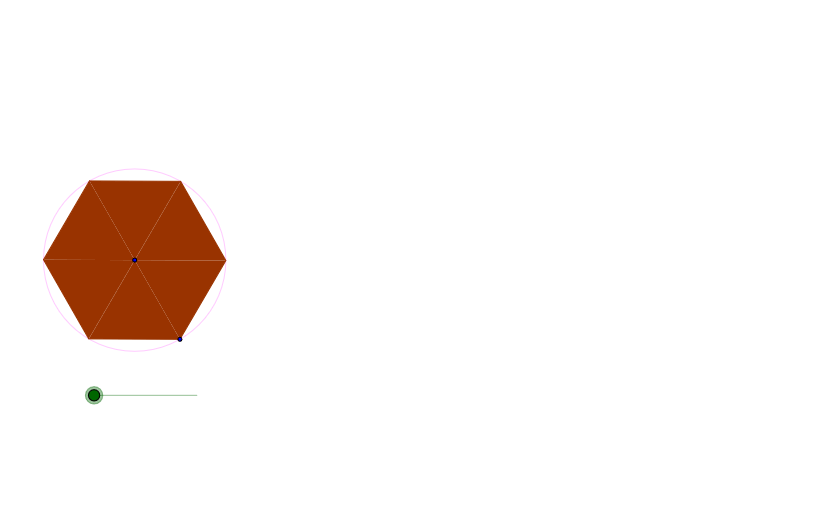
This example demonstrates how to construct a regular hexagon and calculate its area using GeoGebra commands: Circle, Rotate, Polygon, and Mirror. The construction involves: (1) drawing a base circle with the Circle command; (2) generating hexagon vertices by rotating points by 60° using the Rotate command; (3) connecting vertices with the Polygon command to form the hexagon; (4) verifying symmetry through the Mirror command. Key mathematical concepts include properties of regular hexagons, rotational symmetry, axial symmetry transformations, and area formulas. The object list contains numerous primed points (A', A'', A'''), indicating repeated rotation and mirroring of the base figure. This example is suitable for middle school mathematics teaching on polygon properties, geometric transformations (rotation and reflection), and area calculations, as well as GeoGebra geometric construction practice.
GeoGebra Commands & Parameters
Circle(C, B) → cRotate(B, a, C) → C_1Polygon(C, B, C_1) → P, c_1, a_1, bRotate(C, z, B) → A'Rotate(B, z, B) → B'Rotate(C_1, z, B) → C'Polygon(A', B', C') → P', c', a', b'Mirror(A', b') → A''Mirror(B', b') → B''Mirror(C', b') → C''Polygon(A'', B'', C'') → P'', c'', a'', b''Rotate(A'', z, C') → A'''Rotate(B'', z, C') → B'''Rotate(C'', z, C') → C'''Polygon(A''', B''', C''') → P''', c''', a''', b'''Mirror(A''', c''') → A''''Mirror(B''', c''') → B''''Mirror(C''', c''') → C''''Polygon(A'''', B'''', C'''') → P'''', c'''', a'''', b''''Rotate(A'''', z, B''') → A'''''Rotate(B'''', z, B''') → B'''''Rotate(C'''', z, B''') → C'''''Polygon(A''''', B''''', C''''') → P''''', c''''', a''''', b'''''Mirror(A''''', b''''') → A''''''Mirror(B''''', b''''') → B''''''Mirror(C''''', b''''') → C''''''Polygon(A'''''', B'''''', C'''''') → P'''''', c'''''', a'''''', b''''''Rotate(A'''''', z, C''''') → A'''''''Rotate(B'''''', z, C''''') → B'''''''Rotate(C'''''', z, C''''') → C'''''''Polygon(A''''''', B''''''', C''''''') → P''''''', c''''''', a''''''', b'''''''Mirror(A''''''', c''''''') → A''''''''Mirror(B''''''', c''''''') → B''''''''Mirror(C''''''', c''''''') → C''''''''Polygon(A'''''''', B'''''''', C'''''''') → P'''''''', c'''''''', a'''''''', b''''''''Rotate(A'''''''', z, B''''''') → A'''''''''Rotate(B'''''''', z, B''''''') → B'''''''''Rotate(C'''''''', z, B''''''') → C'''''''''Polygon(A''''''''', B''''''''', C''''''''') → P''''''''', c''''''''', a''''''''', b'''''''''Mirror(A''''''''', b''''''''') → A''''''''''Mirror(B''''''''', b''''''''') → B''''''''''Mirror(C''''''''', b''''''''') → C''''''''''Polygon(A'''''''''', B'''''''''', C'''''''''') → P'''''''''', c'''''''''', a'''''''''', b''''''''''Rotate(A'''''''''', z, C''''''''') → A'''''''''''Rotate(B'''''''''', z, C''''''''') → B'''''''''''Rotate(C'''''''''', z, C''''''''') → C'''''''''''Polygon(A''''''''''', B''''''''''', C''''''''''') → P''''''''''', c''''''''''', a''''''''''', b'''''''''''Mirror(A''''''''''', c''''''''''') → A''''''''''''Mirror(B''''''''''', c''''''''''') → B''''''''''''Mirror(C''''''''''', c''''''''''') → C''''''''''''Polygon(A'''''''''''', B'''''''''''', C'''''''''''') → P'''''''''''', c'''''''''''', a'''''''''''', b''''''''''''Rotate(A'''''''''''', z, B''''''''''') → A'''''''''''''Rotate(B'''''''''''', z, B''''''''''') → B'''''''''''''Rotate(C'''''''''''', z, B''''''''''') → C'''''''''''''
AI Drawing Prompt Reference
Draw a regular hexagon. First, draw a circle as the center. Then, rotate points by 60° to generate the vertices of the hexagon. Connect these vertices with a polygon to form the hexagon. Next, use mirror operations to obtain symmetric points to verify the symmetry of the hexagon. This process demonstrates the construction of a regular hexagon and its area calculation.
The prompt above was compiled from the original drawing commands and is for reference only.