
Heights, Medians, and Angle Bisectors of Triangles
Loading the math board and drawing, please wait…
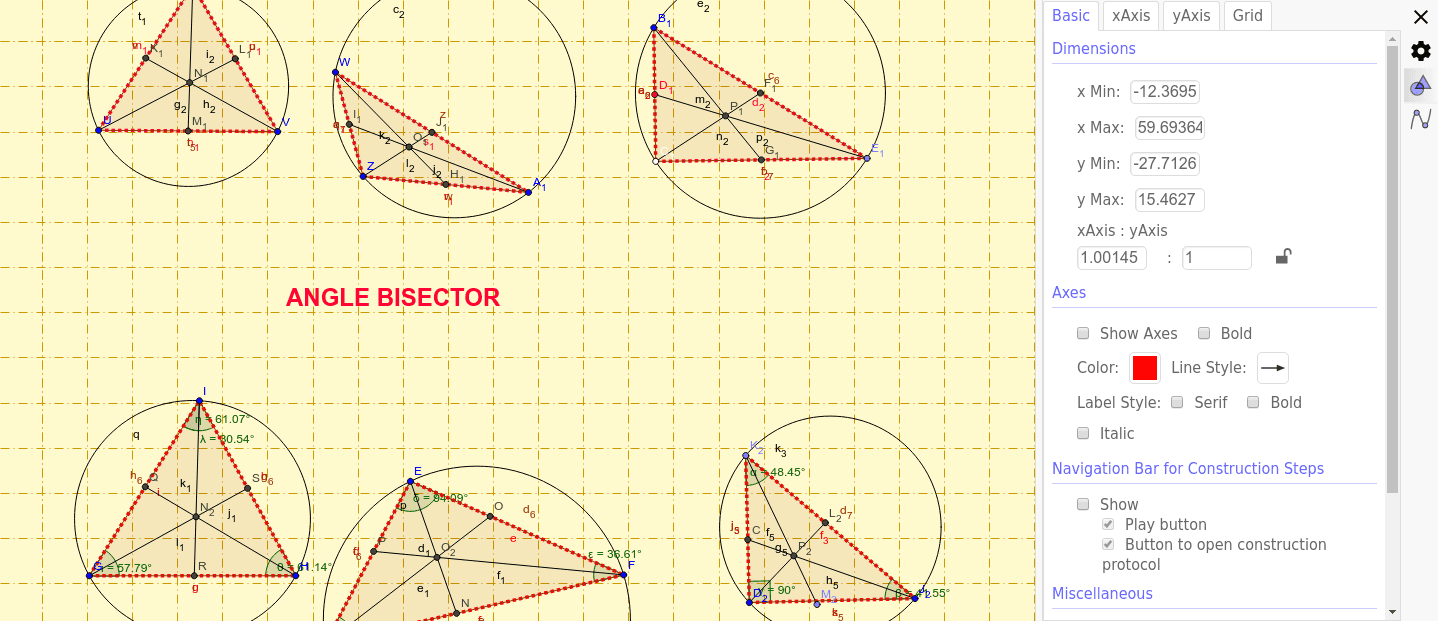
① This interactive GeoGebra example dynamically illustrates the three key cevians of a triangle: altitudes (heights), medians, and angle bisectors, showing their intersections and relationships. ② Core mathematical concepts include the orthocenter, centroid, and incenter, along with the angle bisector theorem, median properties, and symmetry in triangles. ③ Construction details: The applet uses GeoGebra commands such as Segment, Angle, Circle, AngularBisector, Intersect, OrthogonalLine, Point, Midpoint, Rotate, and Polygon to build the triangle and its auxiliary lines. Multiple labeled objects (e.g., D, E, G, d, H, I, etc.) are used to mark vertices, feet, midpoints, and angle bisector points, enabling dynamic manipulation. ④ Suitable for middle and high school geometry classes (grades 8–12), this resource is ideal for teaching triangle properties, geometric construction, and exploratory learning, whether in classroom demonstrations or student self-study.
GeoGebra Commands & Parameters
Segment(E, D) → dSegment(G, H) → gSegment(H, I) → hSegment(G, I) → iSegment(E, F) → eSegment(D, F) → fAngle(D, E, F) → δAngle(E, F, D) → εAngle(F, D, E) → ζAngle(G, I, H) → ηAngle(I, H, G) → θAngle(H, G, I) → ιCircle(E, D, F) → pCircle(G, H, I) → qAngularBisector(F, E, D) → b_1AngularBisector(E, D, F) → a_1AngularBisector(D, F, E) → c_1Intersect(b_1, f) → NSegment(E, N) → d_1Intersect(a_1, e) → OSegment(D, O) → e_1Intersect(c_1, d) → PSegment(P, F) → f_1AngularBisector(G, H, I) → g_1AngularBisector(I, G, H) → h_1AngularBisector(H, I, G) → i_1Intersect(g_1, i) → QSegment(H, Q) → j_1Intersect(i_1, g) → RSegment(I, R) → k_1Intersect(h_1, h) → SSegment(G, S) → l_1Segment(T, U) → m_1Segment(U, V) → n_1Segment(V, T) → p_1Segment(W, Z) → q_1Segment(Z, A_1) → r_1Segment(W, A_1) → s_1Circle(T, U, V) → t_1Circle(W, Z, A_1) → c_2Segment(B_1, C_1) → a_2OrthogonalLine(C_1, a_2) → b_2Point(b_2) → E_1Segment(B_1, E_1) → d_2Segment(C_1, E_1) → f_2Circle(B_1, C_1, E_1) → e_2Midpoint(a_2) → D_1Midpoint(d_2) → F_1Midpoint(f_2) → G_1Midpoint(r_1) → H_1Midpoint(q_1) → I_1Midpoint(s_1) → J_1Midpoint(m_1) → K_1Midpoint(p_1) → L_1Midpoint(n_1) → M_1Segment(U, L_1) → g_2Segment(K_1, V) → h_2Segment(M_1, T) → i_2Segment(I_1, A_1) → j_2Segment(W, H_1) → k_2Segment(Z, J_1) → l_2Segment(B_1, G_1) → m_2Segment(C_1, F_1) → n_2Segment(D_1, E_1) → p_2Intersect(g_2, h_2) → N_1Intersect(j_2, k_2) → O_1Intersect(m_2, n_2) → P_1Segment(Q_1, R_1) → q_2Segment(T_1, U_1) → t_2Segment(T_1, V_1) → a_3Segment(U_1, V_1) → b_3Segment(Z_1, A_2) → d_3Rotate(A_2, 90*°, Z_1) → B_2Angle(A_2, Z_1, B_2) → κSegment(B_2, Z_1) → e_3Segment(B_2, A_2) → c_3Circle(T_1, U_1, V_1) → g_3Circle(B_2, Z_1, A_2) → h_3OrthogonalLine(S_1, q_2) → i_3OrthogonalLine(U_1, a_3) → p_3OrthogonalLine(T_1, b_3) → q_3OrthogonalLine(V_1, t_2) → r_3Intersect(p_3, a_3) → F_2Segment(U_1, F_2) → s_3OrthogonalLine(T_1, b_3) → t_3OrthogonalLine(V_1, t_2) → a_4Intersect(t_3, a_4) → E_2Segment(E_2, F_2) → b_4Segment(T_1, E_2) → c_4Segment(E_2, V_1) → d_4Point(d_4) → G_2Segment(T_1, G_2) → e_4Point(e_4) → H_2OrthogonalLine(V_1, c_4) → g_4OrthogonalLine(T_1, d_4) → h_4Segment(T_1, G_2) → i_4Intersect(g_4, c_4) → I_2Segment(I_2, V_1) → j_4Segment(U_1, G_2) → k_4Segment(I_2, U_1) → l_4Segment(Q_1, W_1) → r_2Segment(R_1, W_1) → s_2Circle(Q_1, R_1, W_1) → kOrthogonalLine(W_1, q_2) → aOrthogonalLine(Q_1, s_2) → bOrthogonalLine(R_1, r_2) → jIntersect(k, j, 2) → AIntersect(k, a, 2) → JIntersect(k, b, 2) → KSegment(R_1, A) → lSegment(J, W_1) → mSegment(K, Q_1) → nIntersect(r_2, l) → LIntersect(s_2, n) → MIntersect(q_2, m) → C_2Polygon(R_1, Q_1, W_1) → poly1, w_1, r_4, q_4Polygon(T_1, U_1, V_1) → poly2, v_1, t_4, u_1Segment(T_1, U_1) → rSegment(D_2, J_2) → sOrthogonalLine(D_2, s) → tPoint(t) → K_2Segment(K_2, J_2) → f_3Segment(K_2, D_2) → j_3Circle(K_2, D_2, J_2) → k_3Angle(D_2, K_2, J_2) → αAngle(K_2, J_2, D_2) → βAngle(J_2, D_2, K_2) → γAngle(G, I, R) → λOrthogonalLine(Z_1, c_3) → cOrthogonalLine(B_2, d_3) → l_3OrthogonalLine(A_2, e_3) → m_3Intersect(c, c_3) → BSegment(Z_1, B) → n_3Segment(B_2, Z_1) → f_4Segment(Z_1, A_2) → m_4AngularBisector(j_3, f_3) → n_4, p_4AngularBisector(f_3, j_3) → s_4, a_5AngularBisector(s, j_3) → b_5, c_5AngularBisector(f_3, s) → d_5, e_5Intersect(d_5, j_3) → CIntersect(c_5, f_3) → L_2Point(n_4) → M_2Segment(K_2, M_2) → f_5Segment(L_2, D_2) → g_5Segment(C, J_2) → h_5Intersect(j_1, k_1) → N_2Intersect(d_1, e_1) → O_2Intersect(f_5, g_5) → P_2Polygon(B_2, Z_1, A_2) → poly3, a_6, b_6, z_1Polygon(T, U, V) → poly4, v, t_5, uPolygon(W, Z, A_1) → poly5, a_7, w, zPolygon(B_1, C_1, E_1) → poly6, e_6, b_7, c_6Polygon(I, G, H) → poly7, h_6, ı, g_6Polygon(E, D, F) → poly8, f_6, e_7, d_6Polygon(K_2, D_2, J_2) → poly9, j_5, k_5, d_7
AI Drawing Prompt Reference
Draw a triangle ABC, connect each vertex to the midpoint of the opposite side to form three medians, connect each vertex to the foot of the perpendicular from the opposite side to form three altitudes, and connect each vertex to the intersection of the angle bisectors of the opposite side to form three angle bisectors. Use rotation and intersection operations to demonstrate the triangle's centroid, orthocenter, and incenter.
The prompt above was compiled from the original drawing commands and is for reference only.