
H-Fractions and Attached Text: Geometric Construction
Loading the math board and drawing, please wait…
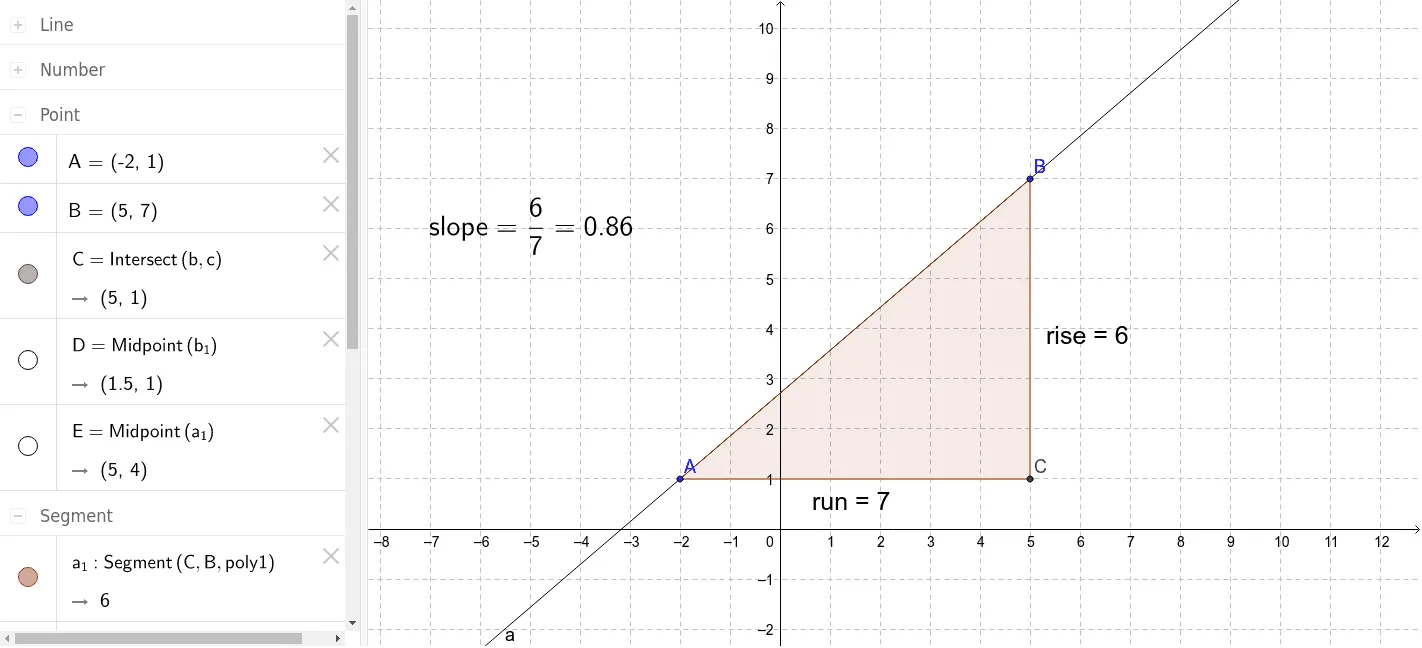
This GeoGebra example demonstrates a geometric construction related to H-Fractions, with attached text annotations. It visualizes how fractions can be represented through geometric elements such as quadrilaterals, reflections, and right triangles, incorporating concepts like the Pythagorean theorem. The construction uses commands including Line, OrthogonalLine, Intersect, Polygon, and Midpoint to create objects A, B, C, D, E, polygon poly1, and auxiliary lines b_1, a_1, c_1, along with rise and run segments that likely represent numerator and denominator. Text objects text1, text2, text3 and slope are used to label and explain the relationships. This example is suitable for middle or high school students learning about fractions in a geometric context, Pythagorean theorem applications, and geometric construction techniques. It serves as an interactive visual aid for teachers to illustrate abstract fraction concepts through concrete shapes.
GeoGebra Commands & Parameters
Line(B, A) → aOrthogonalLine(A, yAxis) → bOrthogonalLine(B, xAxis) → cIntersect(b, c) → CPolygon(A, C, B) → poly1, b_1, a_1, c_1Midpoint(b_1) → DMidpoint(a_1) → E
AI Drawing Prompt Reference
Draw a right triangle ABC with AB as the base and BC as the height. Draw a line perpendicular to the y-axis through point A and a line parallel to the x-axis through point B, which intersect at point C. Then, use points A, C, and B to draw a quadrilateral, marking its sides and diagonals. Find the midpoints of sides AB and BC, labeled D and E, and use text to label and explain the relationships between these points and the quadrilateral and triangle.
The prompt above was compiled from the original drawing commands and is for reference only.