
Guess the Transformation: Scoring Practice
Loading the math board and drawing, please wait…
In collections
Geometry Transformation
Maths for 8th Grade Units 1 to 3
Learn with Lindy: Transformations Intro
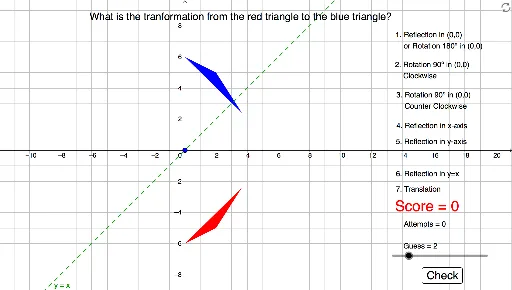
This example randomly transforms a rectangle to let students guess and verify the type of transformation. Key concepts include reflection, rotation, and translation. GeoGebra commands used include Random, Mirror, Rotate, and Translate. Suitable for middle school and above students to practice geometric transformations.
GeoGebra Commands & Parameters
Random(-7, 7) → rxRandom(-6, 3) → ryRandom(1, 4) → bxRandom(1, 3) → byRandom(1, 3) → cxRandom(1, 3) → cyPolygon(A, B, C) → Orig, c, a, bMirror(A, xAxis) → A'Mirror(B, xAxis) → B'Mirror(C, xAxis) → C'Polygon(A', B', C') → Rxaxis, c', a', b'Mirror(A, yAxis) → A'_1Mirror(B, yAxis) → B'_1Mirror(C, yAxis) → C'_1Polygon(A'_1, B'_1, C'_1) → Ryaxis, c'_1, a'_1, b'_1Mirror(A, f) → A'_2Mirror(B, f) → B'_2Mirror(C, f) → C'_2Polygon(A'_2, B'_2, C'_2) → Ryex, c'_2, a'_2, b'_2Mirror(A, Origin) → A'_3Mirror(B, Origin) → B'_3Mirror(C, Origin) → C'_3Polygon(A'_3, B'_3, C'_3) → ROO, c'_3, a'_3, b'_3Rotate(A, (-(90°)), Origin) → A'_4Rotate(B, (-(90°)), Origin) → B'_4Rotate(C, (-(90°)), Origin) → C'_4Polygon(A'_4, B'_4, C'_4) → RotClock, c'_4, a'_4, b'_4Rotate(A, 90°, Origin) → A'_5Rotate(B, 90°, Origin) → B'_5Rotate(C, 90°, Origin) → C'_5Polygon(A'_5, B'_5, C'_5) → RotCountr, c'_5, a'_5, b'_5If(x(A) > 0, Random[-10, -3], Random[3, 10]) → TxIf(y(A) > 0, Random[-7, -3], Random[3, 7]) → TyVector(Origin, V) → uTranslate(A, u) → A'_6Translate(B, u) → B'_6Translate(C, u) → C'_6Polygon(A'_6, B'_6, C'_6) → Trans, c'_6, a'_6, b'_6Random(1, 7) → AnsIf(Ans ≟ Guess, 1, 0) → add
AI Drawing Prompt Reference
Draw an irregular quadrilateral at a random position and size, then reflect it across the x-axis and y-axis to create two new quadrilaterals. Next, rotate the original quadrilateral 90 degrees clockwise around the origin to get another transformed quadrilateral. Finally, translate the original quadrilateral by a random vector to obtain a translated quadrilateral. Draw all the quadrilaterals and their transformations in sequence.
The prompt above was compiled from the original drawing commands and is for reference only.