
Graphing Linear Inequalities: Open Middle Interactive Learning Tool
Loading the math board and drawing, please wait…
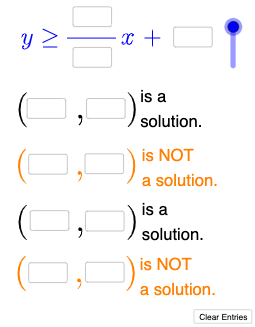
This GeoGebra example demonstrates how to graph linear inequalities interactively. Students input inequality parameters through 10 InputBoxes, and the applet dynamically generates the corresponding inequality graphs using conditional statements. Core mathematical concepts include: graphical representation of linear functions, solution sets of linear inequalities in one variable, and region division on the coordinate plane. Construction details: InputBox components collect parameters (a, b, c, etc.) from users, If commands determine inequality types (> , <, ≥, ≤), and function graphing commands render the corresponding half-planes. This example is suitable for middle school to high school mathematics teaching, ideal for introducing inequality concepts, reinforcement exercises, or as a working platform for Open Middle problem-solving activities.
GeoGebra Commands & Parameters
Textfield(a) → InputBox1Textfield(b) → InputBox2Textfield(c) → InputBox3Textfield(d) → InputBox4Textfield(e) → InputBox5Textfield(f) → InputBox6Textfield(g) → InputBox7Textfield(h) → InputBox8Textfield(i) → InputBox9Textfield(j) → InputBox10Mode(l1) → l2If(Length[l2] ≟ 0, "No digits repeat.", "Repeated digits exist.") → text4If(l ≟ 1, "≤", "≥") → text5If(l ≟ 1, y ≤ p(x), y ≥ p(x)) → mIf(IsInRegion[k, m], "√", "X") → text6If(¬IsInRegion[A, m], "√", "X") → text7Textfield(n) → InputBox11Textfield(o) → InputBox12Textfield(r) → InputBox13Textfield(s) → InputBox14If(IsInRegion[B, m], "√", "X") → text8If(¬IsInRegion[C, m], "√", "X") → text9
AI Drawing Prompt Reference
Build an interactive coordinate-plane diagram for graphing linear inequalities. Allow the user to enter several parameters that determine a boundary line and the associated half-plane, including whether the inequality uses a “≤” or “≥” direction. Based on the chosen parameters, decide whether the boundary is included in the solution set and display the corresponding region on the plane. Then, for two groups of given test points, mark each position with a check symbol if the point lies in the solution region and with an X if it does not. Ensure the display updates as the inputs change so the inequality graph and point labels stay consistent.
The prompt above was compiled from the original drawing commands and is for reference only.