
Graphing a Probability Density Function with Integral Construction
Loading the math board and drawing, please wait…
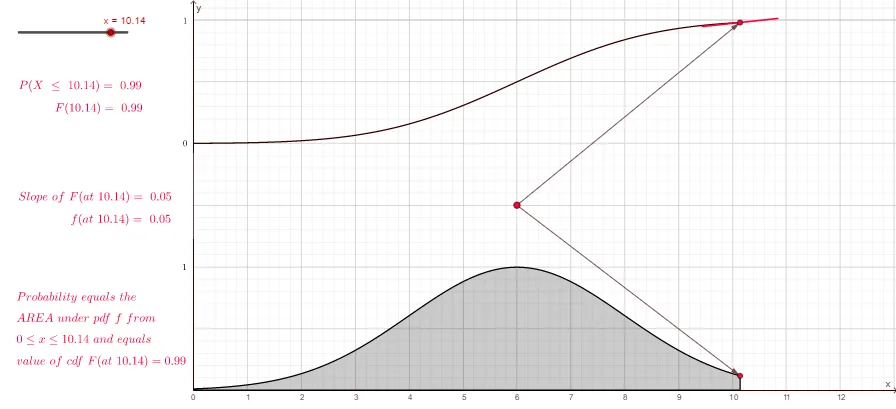
This example demonstrates how a probability density function (PDF) can be visualized through a chosen functional form and how the probability interpretation emerges by computing the area under the curve. It focuses on probability & statistics concepts—PDFs and their probability meaning via definite integrals—while using trigonometric components (e.g., cosine) as part of the constructed expression. The construction is organized with GeoGebra commands reflected in the setup: Integral to compute the area/probability over a specified x-range, Point to create key boundary and intersection points, Intersect to determine where the curve meets auxiliary lines or objects, and Vector to represent relationships such as directions or parameter-driven quantities. Objects listed in the construction (e.g., the points b, g, f, h, k, l, A, p, q, B, t, a, C, u, v, D…K and the bounds xmin/xmax/ymin/ymax) are used to define the plotting window and the integration limits, while text labels (text1–text7) highlight important results. Suitable for upper-secondary students and early undergraduate learners studying probability/statistics alongside calculus and function graphing.
GeoGebra Commands & Parameters
Integral(g(x), 0, b) → tIntegral(l(x), 0, b) → aVector(C, B) → uVector(C, A) → vIntersect(f, yAxis, (0, 4.00269979606326)) → DIntersect(f, yAxis, (0, 4.00269979606326)) → FPoint(yAxis) → HPoint(yAxis) → J
AI Drawing Prompt Reference
Draw a diagram visualizing a probability density function and its integral area: include a density curve f built from trigonometric components (e.g., cosine) together with a related curve l. Use a definite integration range from x = 0 to an upper bound b, and mark the resulting quantities t for the integral of f over [0,b] and a for the integral of l over [0,b], emphasizing the area-under-the-curve interpretation. On the coordinate plane, show intersection points of the curve f with the y-axis at a specified y value (labeled D and F) and also place two auxiliary points on the y-axis (H and J) to anchor the construction. Arrange the labels to highlight how the area corresponds to the probability meaning.
The prompt above was compiled from the original drawing commands and is for reference only.