
Grade 2 Module 3 Lesson 13: Place Value Disks Problem Set
Loading the math board and drawing, please wait…
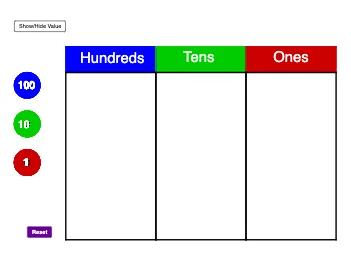
This GeoGebra example demonstrates a problem set for second-grade students using place value disks to visualize numbers and addition. The core math concepts include place value (ones, tens, hundreds), addition of natural numbers, and the base-10 number system. The construction uses the Polygon command to create disk shapes, along with custom commands like Make100, Make10, and Make1 to label disks of different place values, and the Sum command to compute totals. Objects include multiple polygons (poly1, poly2, poly3) and text labels (text51, text52, text53) to show grouping and accumulation. This resource is ideal for elementary students learning place value and addition, and for teachers as a classroom demonstration tool.
GeoGebra Commands & Parameters
Polygon(C_2, D_2, E_2, F_2) → poly1, c_5, d_5, e_4, f_4Polygon(F_2, E_2, G_2, H_2) → poly2, f_5, e_5, g_4, h_4Polygon(H_2, G_2, I_2, J_2) → poly3, h_5, g_5, i_2, j_2Make100(A) → c, text1Make100(B) → d, text2Make100(C) → e, text3Make100(D) → f, text4Make100(E) → g, text5Make100(F) → h, text6Make100(G) → k, text7Make100(H) → p, text8Make100(I) → q, text9Make100(J) → r, text10Make10(K) → s, text11Make10(L) → t, text12Make10(M) → c_1, text13Make10(N) → d_1, text14Make10(O) → e_1, text15Make10(P) → f_1, text16Make10(Q) → g_1, text17Make10(R) → h_1, text18Make10(S) → k_1, text19Make10(T) → p_1, text20Make10(U) → q_1, text21Make10(V) → r_1, text22Make10(W) → s_1, text23Make10(Z) → t_1, text24Make10(A_1) → c_2, text25Make10(B_1) → d_2, text26Make10(C_1) → e_2, text27Make10(D_1) → f_2, text28Make10(E_1) → g_2, text29Make10(F_1) → h_2, text30Make1(G_1) → k_2, text31Make1(H_1) → p_2, text32Make1(I_1) → q_2, text33Make1(J_1) → r_2, text34Make1(K_1) → s_2, text35Make1(L_1) → t_2, text36Make1(M_1) → c_3, text37Make1(N_1) → d_3, text38Make1(O_1) → e_3, text39Make1(P_1) → f_3, text40Make1(Q_1) → g_3, text41Make1(R_1) → h_3, text42Make1(S_1) → k_3, text43Make1(T_1) → p_3, text44Make1(U_1) → q_3, text45Make1(V_1) → r_3, text46Make1(W_1) → s_3, text47Make1(Z_1) → t_3, text48Make1(A_2) → c_4, text49Make1(B_2) → d_4, text50Polygon(D_2, K_2, L_2, E_2) → poly4, d_6, k_4, l_2, e_6Polygon(E_2, L_2, M_2, G_2) → poly5, e_7, l_1, m_2, g_6Polygon(G_2, M_2, N_2, I_2) → poly6, g_7, m_1, n_2, i_1Sum(Sequence[IsInRegion[Element[listOnes, i], poly6], i, 1, 20]) → valueOnes
AI Drawing Prompt Reference
Draw three tens disks and one hundreds disk, each with different colors for ones, tens, and hundreds. First, draw three tens disks with different colors for ones and tens, then draw one hundreds disk with different colors for ones, tens, and hundreds. Next, use the Make100 command to add 10 units to each disk, use the Make1 command to add 1 unit to each unit, and finally use the Sum command to calculate the total.
The prompt above was compiled from the original drawing commands and is for reference only.