
Hide Zero Cards Digit Practice
Loading the math board and drawing, please wait…
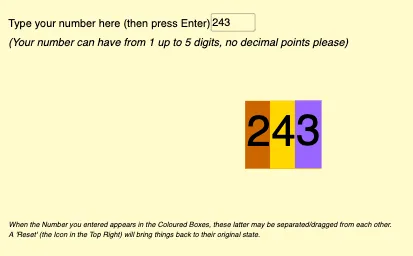
This example demonstrates how to practice place value and digit concepts by hiding and showing number cards. The math concepts involved include natural numbers, digit decomposition, and place value understanding. Construction highlights the use of GeoGebra commands like Length, Textfield, TextToUnicode, Sequence, Element, If, and objects such as numero, digits, inputBox1, list1, list2. Suitable for lower elementary students learning about place value and digits.
GeoGebra Commands & Parameters
Length(numero) → digitsTextfield(numero) → inputBox1TextToUnicode(numero) → list1Sequence(Element[list1, i] - 48, i, 1, digits) → list2Element(list2, 1) → aIf(digits ≟ 5, Element[list2, 3], If[digits ≟ 4, Element[list2, 2], If[digits ≟ 3, Element[list2, 1], If[digits < 3, 0, 0]]]) → hunIf(digits ≟ 5, Element[list2, 2], If[digits ≟ 4, Element[list2, 1], If[digits < 4, 0, 0]]) → thousIf(digits ≟ 5, Element[list2, 1], If[digits < 5, 0, 0]) → tenthousIf(digits ≟ 5, Element[list2, 4], If[digits ≟ 4, Element[list2, 3], If[digits ≟ 3, Element[list2, 2], If[digits ≟ 2, Element[list2, 1], If[digits < 2, 0, 0]]]]) → tenIf(digits ≟ 5, Element[list2, 5], If[digits ≟ 4, Element[list2, 4], If[digits ≟ 3, Element[list2, 3], If[digits ≟ 2, Element[list2, 2], If[digits < 2, Element[list2, 1], 0]]]]) → one
AI Drawing Prompt Reference
Create a digit card practice diagram, hide the zero cards, and display cards for the ones, tens, hundreds, and thousands. An input box shows a number, and based on the number of digits, display the corresponding number of cards. For example, if the input is 5032, display 5 cards representing 5 thousands, 0 hundreds, 3 tens, and 2 ones.
The prompt above was compiled from the original drawing commands and is for reference only.