
Golden Rectangle Investigation
Loading the math board and drawing, please wait…
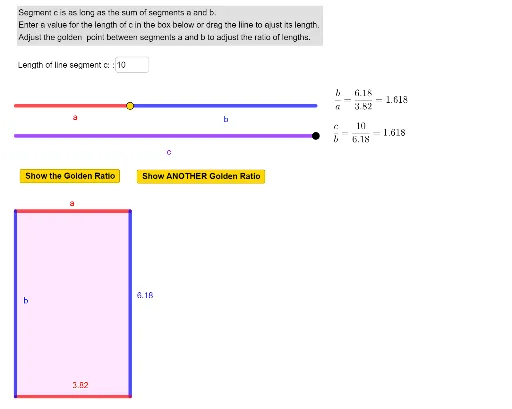
This example demonstrates how adjusting line segments visually represents the golden ratio in rectangle dimensions. Key math concepts include the golden ratio, rectangle geometry, and ratio calculations. It is constructed using GeoGebra commands like Point, Segment, Polygon, Textfield, involving objects such as line2, l, C_1, line1, f, A, C, B, etc. Suitable for high school mathematics teaching, emphasizing geometric construction and the integration of shapes and numbers.
GeoGebra Commands & Parameters
Point(f) → APoint(f) → BSegment(A, B) → aSegment(B, C) → bSegment(A_1, C_1) → cSegment(R_1, R_2) → hSegment(R_2, R_3) → iSegment(R_3, R_4) → jSegment(R_4, R_1) → kPolygon(R_1, R_2, R_3, R_4) → q1, r1, r2, r3, r4Textfield(l) → InputBox1
AI Drawing Prompt Reference
Draw a golden rectangle by first creating points A and B on a line and connecting them to form segment a. Then create point C and connect B and C to form segment b. Use points A and C to create segment c. Next, create four rectangle vertices R1, R2, R3, R4 and connect them to form a rectangle. Finally, add a text input box to the canvas for entering and displaying relevant information.
The prompt above was compiled from the original drawing commands and is for reference only.