
Geometry of a Traffic Sign
Loading the math board and drawing, please wait…
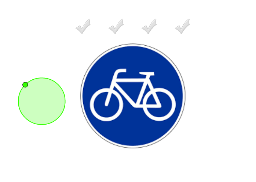
This example demonstrates matching a geometric figure to its corresponding part in a picture by dragging. It involves core math concepts like Circle, Trigonometric Functions, Equilateral Triangles, Arithmetic Mean, Symmetry, and Square. Construction highlights the use of GeoGebra commands/objects such as Vector, Circle, Polygon, Line, Point, Segment, Intersect, and Centroid as per the summary. Suitable for high school mathematics teaching, focusing on geometric construction and spatial reasoning skills.
GeoGebra Commands & Parameters
Vector(C_3, E_3) → vVector(C_3, D_3) → uCircle(U_2, V_2) → q_1Circle(W_2, Z_2) → r_1Circle(A_3, B_3) → s_1Polygon(C_3, D_3, E_3) → poly1, e_3, c_3, d_3Circle(H_3, I_3) → d_2Circle(F_3, G_3) → t_1Circle(J_3, K_3) → c_2Line(L_3, M_3) → bLine(L_3, N_3) → i_1Point(b) → O_3Segment(M_3, N_3) → j_1Line(O_3, j_1) → l_1Intersect(i_1, l_1) → P_3Polygon(L_3, O_3, P_3) → poly2, p_3, l_3, o_3Centroid(poly2) → MCentroid(poly1) → N
AI Drawing Prompt Reference
Draw a geometric figure of a traffic sign. Start with an equilateral triangle, and inside it place three circles, each centered at a vertex or a point on a side. From one vertex, draw two vectors to the other two vertices. Outside the triangle, draw two lines: one through a vertex, the other intersecting it. On the first line, pick a point, connect it to another vertex of the triangle with a segment, then draw a line through that point perpendicular to the segment, intersecting the second line, forming a smaller triangle. Finally, mark the centroids of both triangles.
The prompt above was compiled from the original drawing commands and is for reference only.