
Geometry 2.5: Using Postulates and Diagrams
Loading the math board and drawing, please wait…
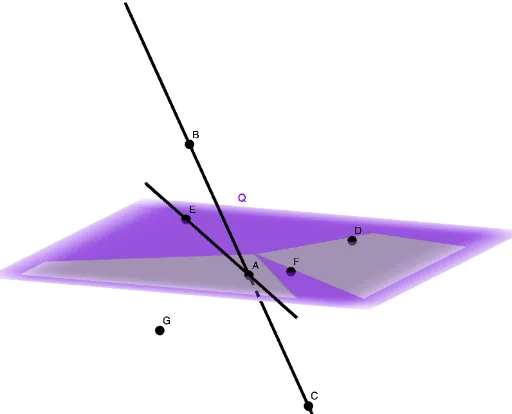
This example demonstrates how to apply geometric postulates in conjunction with diagrams to reason about spatial relationships. It showcases the construction of points, lines, and planes, and explores concepts such as incidence, coplanarity, and the implications of postulates for congruence and similarity (including equilateral and similar triangles). The construction uses GeoGebra commands: Line, Plane, and PointIn, with objects including points A, B, C, D, E, F, G, Q, lines f and g, and plane H. This resource is suitable for high school geometry or introductory college geometry courses, helping students connect formal postulates to visual reasoning and proof. It also serves as an instructional tool for teachers to illustrate how postulates guide diagram-based problem solving.
GeoGebra Commands & Parameters
Line(C, A) → fPlane(E, D, F) → QLine(A, E) → gPointIn(Q) → H
AI Drawing Prompt Reference
Draw a geometric figure showing the relationships between points, lines, and planes. Start by constructing a line segment, then create a plane defined by three points, draw another line through the endpoints of the first line, and finally mark a point on the plane to illustrate spatial connections.
The prompt above was compiled from the original drawing commands and is for reference only.