
Geometric Transformations and Angle Relationships
Loading the math board and drawing, please wait…
In collections
Constructing Conic Sections
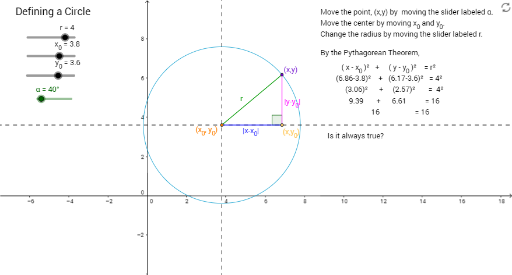
This example demonstrates geometric transformations, specifically rotations and angle relationships. Using GeoGebra commands such as Circle, Intersect, OrthogonalLine, and Rotate, a series of geometric figures are constructed to explore the relationship between angles and rotations. Suitable for high school geometry and calculus courses.
GeoGebra Commands & Parameters
Circle(C, r) → cIntersect(xAxis, yAxis) → AOrthogonalLine(C, yAxis) → aOrthogonalLine(C, a) → bIntersect(c, a, 1) → BRotate(B, α, C) → B'Angle(B, C, B') → βOrthogonalLine(B', a) → dSegment(C, B') → eIntersect(a, d) → DSegment(B', D) → fSegment(D, C) → gAngle(B', D, C) → γ
AI Drawing Prompt Reference
Draw a circle C, then draw the perpendicular line a to the y-axis at the intersection of the x-axis and y-axis, followed by the perpendicular line b to a. Find the intersection B of c and a, rotate B around C by angle α to get B', calculate the angle β of ∠BCB', then draw the perpendicular line d to B'. Connect C and B' to form segment e, find the intersection D of a and d, connect B' and D to form segment f, connect D and C to form segment g, and calculate the angle γ of ∠B'DC.
The prompt above was compiled from the original drawing commands and is for reference only.