
Visualizing Conic Sections
Loading the math board and drawing, please wait…
In collections
Constructing Conic Sections
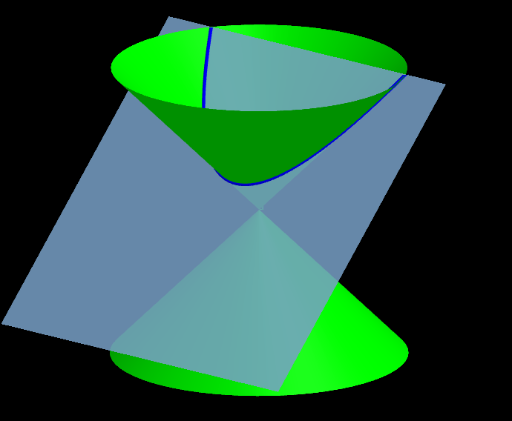
This GeoGebra example demonstrates the generation of conic sections by intersecting a cone with a plane. It visually illustrates how different angles and positions produce ellipses, hyperbolas, and parabolas. Key mathematical concepts include the definition of conic sections, foci, eccentricity, and the intersection angle between a plane and a cone. Construction involves commands such as InfiniteCone, Line, Plane, and IntersectPath, along with associated geometric objects. It is suitable for high school analytic geometry, conic section units, and independent learners exploring curve properties.
GeoGebra Commands & Parameters
InfiniteCone((0, 0, 0), (0, 0, 1), α) → aLine((0, 0, 0), (0, sin(β), cos(β))) → cLine(A, c) → eLine(A, (1, 0, h)) → bPlane(b, e) → dIntersectPath(d, a) → f
AI Drawing Prompt Reference
Draw a three-dimensional cone with its apex at the origin and its axis pointing vertically upward. Inside the cone, place a line starting from the apex at an angle to the axis, and another line through a point on the first line at a different angle to the horizontal. These two lines define an inclined plane. This plane intersects the cone's lateral surface, producing a curve that, depending on the plane's tilt, appears as an ellipse, hyperbola, or parabola. Clearly show the cone, the plane, the intersection curve, and the auxiliary lines, and label the key angles.
The prompt above was compiled from the original drawing commands and is for reference only.