
Geometric Symmetry Analysis of Velázquez's Las Meninas
Loading the math board and drawing, please wait…
In collections
geometriadinamica.es
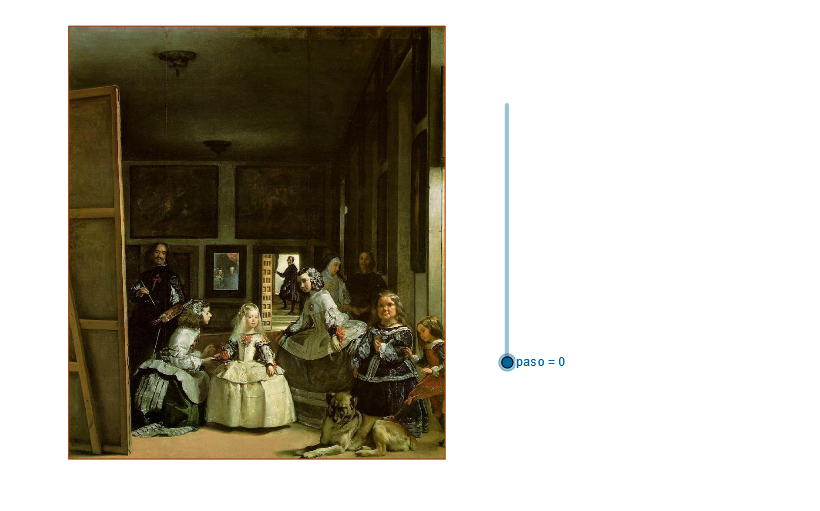
This example uses GeoGebra to analyze the spatial composition and symmetry relationships in Velázquez's famous painting 'Las Meninas'. Through commands including Line, Point, Circle, Polygon, Segment, CircleArc, LineBisector, OrthogonalLine, Dilate, and Intersect, it demonstrates geometric constructions such as point-line relationships, circular arcs for perspective, polygon building, dilation transformations, and angle bisectors. Covers concepts of subtraction, symmetry, step functions, hypothesis testing, and box plots. Suitable for secondary and university geometry courses, interdisciplinary art-mathematics teaching, and introductory coordinate geometry learning.
GeoGebra Commands & Parameters
If(paso > 0 ∧ paso < 7, 1, 0) → t_1If(paso > 1 ∧ paso < 7, 1, 0) → t_2If(paso > 2 ∧ paso < 7, 1, 0) → t_3If(paso > 3 ∧ paso < 7, 1, 0) → t_4If(paso > 4 ∧ paso < 7, 1, 0) → t_5If(paso > 5 ∧ paso < 7, 1, 0) → t_6Line(H1, H2) → aLine(A, a) → bOrthogonalLine(A, a) → cPoint(b) → BDilate(B, pr, A) → DilCircle(A, Dil) → dIntersect(d, c) → D5, COrthogonalLine(C, c) → eOrthogonalLine(B, b) → fIntersect(f, e) → DPolygon(A, B, D, C) → P, a_1, b_1, d_1, c_1OrthogonalLine(B_1, b_1) → hIntersect(c_1, h) → FIntersect(b_1, h) → GSegment(G, F) → jOrthogonalLine(B_2, b_1) → lDilate(A, fi, B) → A'Dilate(B, fi, B) → B'Segment(A', B') → gOrthogonalLine(A', h) → iIntersect(h, i) → ECircle(A, A') → kIntersect(l, c_1) → HIntersect(i, l) → ICircle(F, H) → pOrthogonalLine(B_3, g) → mIntersect(m, l) → JCircleArc(E, A', G) → qCircleArc(I, H, A') → rIntersect(m, h) → KPoint(l) → LCircleArc(J, K, H) → sCircle(E, K) → tOrthogonalLine(B_4, b_1) → nIntersect(n, i) → OIntersect(n, m) → QCircleArc(Q, O, K) → g_1OrthogonalLine(A_6, b_1) → e_1OrthogonalLine(O, i) → h_1OrthogonalLine(B_5, l) → f_1Circle(O, I) → k_1Intersect(f_1, h_1) → SIntersect(f_1, l) → VCircleArc(S, V, O) → p_1Circle(J, V) → q_1OrthogonalLine(B_6, b_1) → i_1Intersect(i_1, m) → WIntersect(f_1, i_1) → ZCircleArc(Z, W, V) → r_1Segment(E, A') → j_1Segment(I, H) → l_1Segment(J, K) → m_1Segment(Q, O) → n_1Segment(V, S) → s_1Segment(Z, W) → a_2Line(M, i_1) → b_2Point(b_2) → NPoint(b_2) → TLineBisector(T, N) → c_2Point(c_2) → UPolygon(N, U, T) → Y, t_7, n_2, uPoint(b_2) → C_1LineBisector(N, C_1) → d_2Point(d_2) → D_1Polygon(N, D_1, C_1) → P_1, c_3, n_3, d_3Intersect(c_2, d_1) → E_1Intersect(c_2, a_1) → F_1Intersect(d_2, a_1) → G_1Intersect(d_1, d_2) → H_1Segment(E_1, F_1) → e_2Segment(G_1, H_1) → f_2Point(b_2) → I_1Line(I_1, n_3) → g_2Line(N, D_1) → h_2Intersect(g_2, h_2) → J_1Segment(N, J_1) → i_2Segment(J_1, I_1) → j_2Segment(I_1, N) → k_2OrthogonalLine(J_1, k_2) → l_2Point(l_2) → K_1Segment(K_1, J_1) → m_2
AI Drawing Prompt Reference
Create a geometric symmetry analysis diagram based on Velázquez's famous painting 'Las Meninas'. Start by drawing two intersecting lines a and b, then construct points A and B. Draw a perpendicular line c from point B to line b, and construct a circle d with center A and diameter B. The circle intersects line c at point C. Next, construct a polygon ABCD and its symmetrical figures, including line segment j, arc q, arc r, arc s, and so on, to form a complex geometric shape.
The prompt above was compiled from the original drawing commands and is for reference only.