
Geometric Representation of Complex Roots
Loading the math board and drawing, please wait…
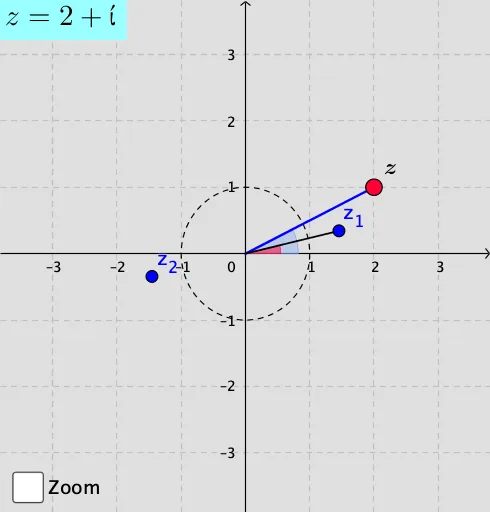
This example demonstrates the geometric representation of complex roots in the complex plane. It involves core mathematical concepts such as complex numbers, modulus, argument, and trigonometric functions. Key GeoGebra commands and objects used include Angle, Sequence, Element, TableText, Segment, Circle, If, and Textfield. Suitable for high school and above, it helps visualize and understand the geometric meaning of complex operations and their visual representations.
GeoGebra Commands & Parameters
Angle((1000, 0), (0, 0), Z) → angleZSequence((rZ^(1 / n) * (cos(thetaZ / n + (((2 * k) * π)) / n) + (ί * sin(thetaZ / n + (((2 * k) * π)) / n)))), k, 0, n - 1) → list1Element(list1, 10) → z_{10}Element(list1, 9) → z_{9}Element(list1, 8) → z_{8}Element(list1, 7) → z_{7}Element(list1, 6) → z_{6}Element(list1, 5) → z_{5}Element(list1, 4) → z_{4}Element(list1, 3) → z_{3}Element(list1, 2) → z_{2}Element(list1, 1) → z_{1}Sequence({Element[listz, i]}, i, 1, n) → listz1Sequence({Element[list1, i]}, i, 1, n) → list2TableText(listz1) → text1Segment((0, 0), Z) → gTableText({{LaTeX[xmax, true, true]}, {LaTeX[xmin, true, true]}, {LaTeX[ymax, true, true]}, {LaTeX[ymin, true, true]}}) → text3Circle((0, 0), 1) → cIf(0 ≤ (Angle * π) < (2 * π), Angle[(1000, 0), (0, 0), Element[list1, 1]], If[(2 * π) ≤ (Angle * π) < (4 * π), Angle[(1000, 0), (0, 0), Element[list1, 2]], Angle[(1000, 0), (0, 0), Element[list1, 3]]]) → αIf(0 ≤ (Angle * π) < (2 * π), Segment[(0, 0), Element[list1, 1]], If[(2 * π) ≤ (Angle * π) < (4 * π), Segment[(0, 0), Element[list1, 2]], Segment[(0, 0), Element[list1, 3]]]) → fTextfield(Angle) → InputBox1Textfield(Modulus) → InputBox2TableText(listz1) → text8
AI Drawing Prompt Reference
Draw a geometric representation of complex roots in the complex plane. Start by drawing a ray from the origin to represent the initial angle. Then, calculate the positions of multiple complex roots using trigonometric functions based on the given modulus and angle, and connect these points sequentially with line segments. Include a unit circle and display the positions and coordinates of the complex roots on the plane. Finally, label the key angles and modulus values.
The prompt above was compiled from the original drawing commands and is for reference only.