
Geometric Mean
Loading the math board and drawing, please wait…
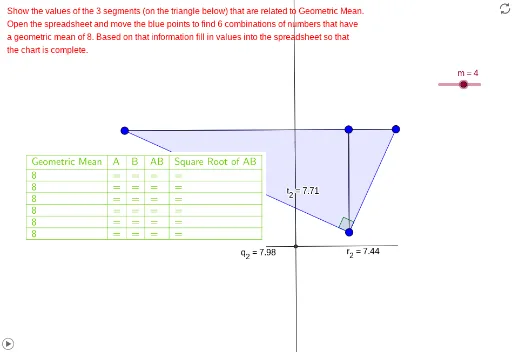
This example demonstrates the construction of geometric mean using the concept of geometric mean. It involves key mathematical concepts such as geometric mean, circle, and angle. Using GeoGebra commands like Segment, Semicircle, Point, etc., the construction of geometric mean-related figures is achieved. Suitable for high school mathematics education and learning.
GeoGebra Commands & Parameters
Segment(Z, A_1) → t_1Semicircle(Z, A_1) → d_1Point(d_1) → B_1OrthogonalLine(B_1, t_1) → a_1Intersect(t_1, a_1) → C_1Segment(C_1, A_1) → h_2Segment(Z, C_1) → g_2Line(A, B) → fOrthogonalLine(C, f) → gRotate(A, (-(90°)), C) → A'Angle(A', C, A) → αLine(C, A') → hIntersect(f, h) → DIntersect(f, g) → EPolygon(A, C, E) → poly1, e, a, cPolygon(E, C, D) → poly2, d, e_1, c_1Segment(E, C) → iSegment(E, C) → jSegment(A, E) → kSegment(E, D) → lTableText({{A1, B1, C1, D1, E1}, {A2, B2, C2, D2, E2}, {A3, B3, C3, D3, E3}, {A4, B4, C4, D4, E4}, {A5, B5, C5, D5, E5}, {A6, B6, C6, D6, E6}, {A7, B7, C7, D7, E7}}, "|_") → text4TableText({{A9, B9, C9, D9, E9}, {A10, B10, C10, D10, E10}, {A11, B11, C11, D11, E11}, {A12, B12, C12, D12, E12}, {A13, B13, C13, D13, E13}, {A14, B14, C14, D14, E14}, {A15, B15, C15, D15, E15}, {A16, B16, C16, D16, E16}, {A17, B17, C17, D17, E17}, {A18, B18, C18, D18, E18}, {A19, B19, C19, D19, E19}}, "|_") → text6Semicircle(F, G) → pPoint(p) → HSegment(F, G) → nMidpoint(n) → IPolygon(H, F, G) → poly3, g_1, h_1, f_1Semicircle(R, S) → rPoint(r) → TPolygon(R, T, S) → poly6, s, r_1, tOrthogonalLine(T, t) → i_1Intersect(i_1, t) → USegment(U, T) → q_1Polygon(N, O, 4) → poly5, q, n_1, p_1, s_1, P, QPolygon(Z, B_1, A_1) → poly7, a_2, z_1, b_1Segment(B_1, C_1) → f_2Textfield(u) → InputBox1Segment(A_1, D) → i_2Segment(B_1, C_1) → GeometricMean_1Segment(D_1, H) → GeometricMeanSegment(E_1, H) → MeanOrthogonalLine(H, n) → l_2Intersect(n, h_1) → F_1Intersect(l_2, n) → G_1Midpoint(n) → H_1Segment(F, G_1) → m_2Segment(G_1, G) → n_2Segment(U, R) → j_2Segment(U, S) → k_2Rotate(R, 90°, U) → R'OrthogonalLine(R', i_1) → j_1OrthogonalLine(S, j_1) → k_1Intersect(j_1, k_1) → JPolygon(U, R', J, S) → ab, u_1, r', j_3, s_2CircleArc(U, R, R') → c_2Segment(R, U) → l_1Line(F, G) → m_1OrthogonalLine(H, m_1) → p_2Intersect(m_1, p_2) → KSegment(F, K) → q_2Segment(K, G) → r_2Segment(H, K) → t_2
AI Drawing Prompt Reference
Draw a geometric mean diagram, including a line segment and its semicircle, find the midpoint of the line segment, draw a perpendicular line, intersect it with the semicircle to get a point, connect this point to the ends of the line segment to form two triangles. Rotate a perpendicular line from the midpoint to get another point, connect it to one end of the line segment to form another triangle. Finally, label the geometric mean-related segments and angles to demonstrate the concept of geometric mean.
The prompt above was compiled from the original drawing commands and is for reference only.