
Geometric Definition of Ellipse
Loading the math board and drawing, please wait…
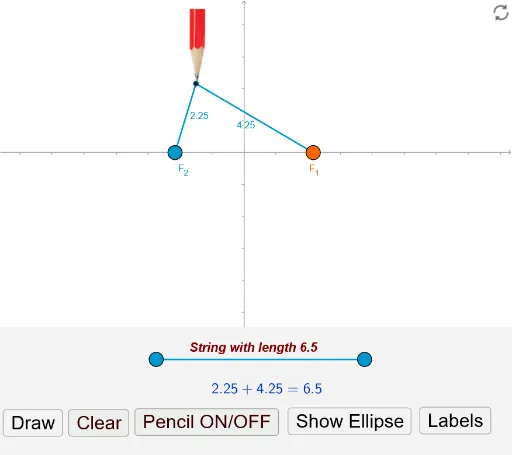
This example demonstrates the geometric definition of an ellipse: the set of all points in a plane such that the sum of their distances to two fixed points (foci) is constant. Key math concepts include ellipse, foci, distance, and geometric construction. It is constructed using GeoGebra commands like Intersect, Ray, Point, Mirror, Line, Segment, Circle, Ellipse, Distance, If, Polygon, OrthogonalLine, Vector, and Midpoint. Suitable for high school mathematics education to understand the geometric nature and construction methods of ellipses.
GeoGebra Commands & Parameters
Intersect(xAxis, yAxis) → ERay((0.01, 0), (1, 0)) → xxRay((0.01, 0), (0, 1)) → yyPoint(axis) → F_1Mirror(F_1, E) → F_2Line(B, xAxis) → iPoint(i) → DPoint(i) → CSegment(C, D) → aaCircle(F_2, a) → eCircle(F_1, a) → dIntersect(e, d) → P, G, ,Ellipse(F_2, F_1, P) → fPoint(f) → RDistance(E, F_1) → cSegment(F_2, R) → bSegment(R, F_1) → gIf(aa > (2 * c), true, false) → shPolygon(Corner[1], Corner[2], (x(Corner[2]), y(Corner[2]) + (0.28 * Distance[Corner[3], Corner[2]])), (x(Corner[4]), y(Corner[1]) + (0.28 * Distance[Corner[3], Corner[2]]))) → Bottom, j, k, l, mLine(F_1, F_2) → nOrthogonalLine(E, n) → pIntersect(f, n) → A, KIntersect(f, p) → L, MPoint(K, Vector[((UnitVector[p] * 1.2) * a)]) → K1Mirror(K1, p) → K1'Vector(K1, K) → uVector(K1', A) → vSegment(K1, K1') → qMidpoint(q) → NPoint(M, Vector[(-(((UnitVector[n] * 1.28) * a)))]) → M1Mirror(M1, n) → M1'Segment(M1, M1') → rVector(M1', L) → wVector(M1, M) → sMidpoint(r) → QIf(y(M) > 0, M, L) → POIf(y(M) < 0, M, L) → NE
AI Drawing Prompt Reference
Draw an ellipse demonstrating its geometric definition: the set of all points in a plane such that the sum of their distances to two fixed points (foci) is constant. Start by plotting the intersection of coordinate axes, create two rays, and get a point. Mirror this point to obtain the second focus. Then draw a line segment and use it as the radius to draw two circles. The intersection points of these circles define the ellipse. Finally, use these points to draw the ellipse, clearly showing the geometric construction with foci, line segments, and circles.
The prompt above was compiled from the original drawing commands and is for reference only.