
Geometric Construction of Vector Addition: Translation and Resultant Vector
Loading the math board and drawing, please wait…
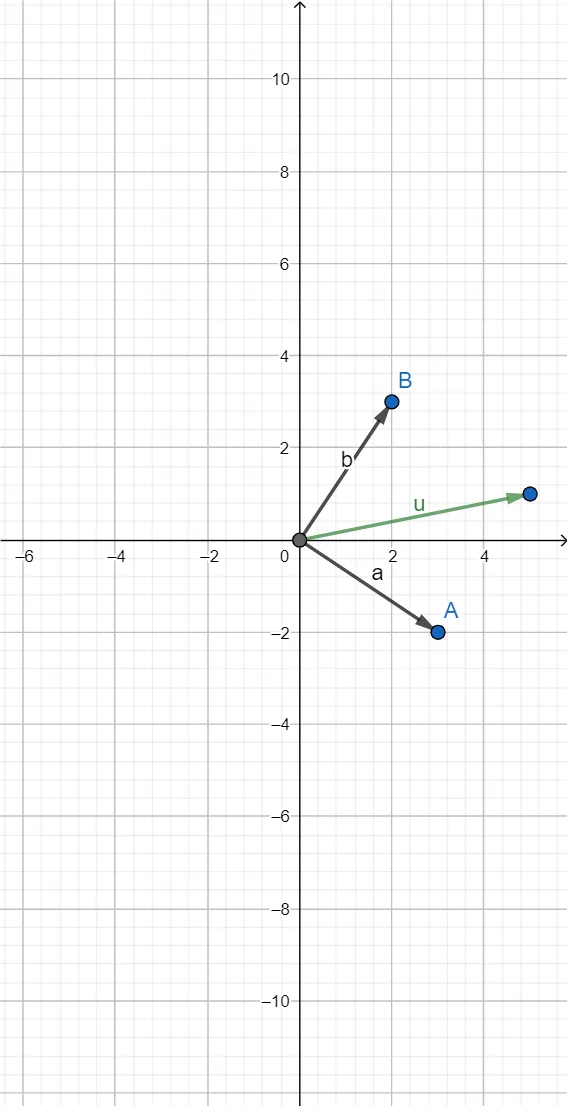
This example demonstrates how to construct vector addition geometrically and how intersection-based points help visualize the formation of the resultant (sum) vector. The key mathematical ideas are vector translation, vector addition (head-to-tail and related geometric composition), and the use of constructed points to represent directions and positions. Construction highlights: it uses the GeoGebra command Intersect together with vector-related objects (Vector) to compute and refine key intersection points, employing the specified objects/points A, B, C, b, a, D, and u. By translating and combining the given vectors, the final resultant vector emerges as the vector connecting the appropriate constructed start/end points. Suitable for middle/high school vector lessons, classroom demonstrations, and early competition-style geometric reasoning.
GeoGebra Commands & Parameters
Intersect(xAxis, yAxis) → CVector(C, B) → bVector(C, A) → aVector(C, D) → u
AI Drawing Prompt Reference
Draw a coordinate system with x and y axes. Start from the origin and draw two vectors connecting to a point on the x-axis and another point not on the axes. Then, draw a vector from the origin connecting to the x-axis point and one of the previous points. Finally, draw a vector from the end of the first vector to the end of the second vector, representing the vector addition result.
The prompt above was compiled from the original drawing commands and is for reference only.