
Geometric Construction of Inscribed Sphere in a Cube
Loading the math board and drawing, please wait…
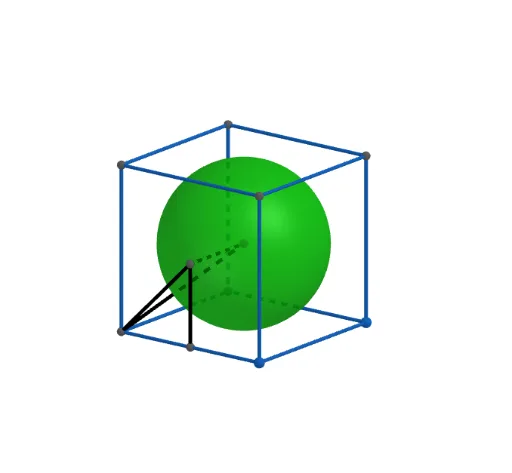
This GeoGebra example demonstrates how to construct a sphere inscribed in a cube. The core mathematical concepts include the spatial structure of cubes, the definition of inscribed spheres, point-line-plane positional relationships, and coordinate systems in 3D space. Construction steps: First, use the Cube command to create cube ABCD-EFGH, then use Midpoint to find midpoints of edges, create the sphere center using Point command, construct the sphere using Sphere command with radius equal to the distance from center to cube faces, and verify tangency using Intersect command. This example is suitable for secondary school solid geometry teaching, explaining inscribed and circumscribed sphere problems, and helping students understand spatial relationships between spheres and polyhedra.
GeoGebra Commands & Parameters
Intersect(zAxis, xAxis) → APoint(xAxis) → BPoint(Circle[B, Distance[A, B], Segment[A, B]]) → CCube(A, B, C) → a, D, faceCDHG, faceEFGH, edgeAD, edgeAB, edgeBC, edgeCD, edgeAE, edgeDH, edgeEH, edgeEF, E, edgeBF, edgeFG, edgeCG, edgeGH, F, G, H, faceABCD, faceADHE, faceABFE, faceBCGFMidpoint(B, H) → IMidpoint(E, B) → JSphere(I, J) → bSegment(I, A) → fSegment(J, A) → gSegment(I, J) → hMidpoint(A, B) → KSegment(J, K) → i
AI Drawing Prompt Reference
Draw a cube and construct its inscribed sphere tangent to all six faces. Determine the cube’s eight vertices, use the midpoint of a body diagonal as the sphere’s center, and set the radius equal to the distance from the center to any face. Also show the segment from the center to a vertex, the segment from the center to the midpoint of an edge, and the segment connecting two edge midpoints, illustrating the spatial relationships among the sphere center and the cube’s elements.
The prompt above was compiled from the original drawing commands and is for reference only.