
Geometric Construction of Conics using Eccentricity
Loading the math board and drawing, please wait…
In collections
Conic Sections
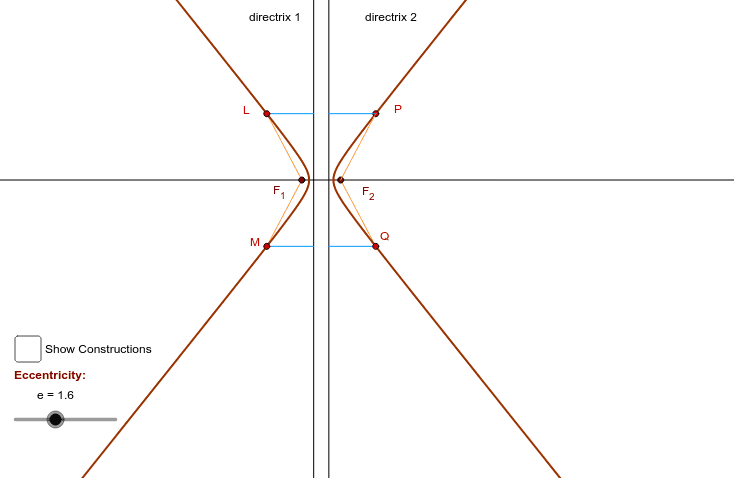
This example demonstrates the geometric construction of conic sections based on their eccentricity. It involves core mathematical concepts such as eccentricity, ellipse, hyperbola, and geometric constructions. The construction utilizes GeoGebra commands and objects like Circle, OrthogonalLine, Point, Ray, Intersect, Segment, Line, Locus, Distance, Midpoint, Mirror, and Polygon. It is suitable for high school and above students to understand the geometric definitions and properties of conic sections.
GeoGebra Commands & Parameters
Circle(B, e) → fOrthogonalLine(A, a) → bPoint(b) → F_1Ray(B, C_2) → cRay(B, D_2) → dIntersect(f, d) → D, NPoint(B, Vector[20 * Vector[B, D]]) → E_1Circle(B, 1) → e_1Intersect(e_1, c) → C,Segment(D, C) → gPoint(d) → GLine(G, g) → hIntersect(h, c) → HSegment(G, H) → iSegment(G, B) → jSegment(H, B) → kIntersect(a, b) → ICircle(I, k) → pIntersect(p, b) → J, KLine(J, a) → lCircle(F_1, j) → qIntersect(q, l) → L, MLocus(M, G) → loc1Locus(L, G) → loc2Segment(L, F_1) → nOrthogonalLine(L, a) → rIntersect(a, r) → Q_1Segment(L, Q_1) → sDistance(F_1, a) → dfCircle(F_1, dv) → tIntersect(t, b) → R_1, SCircle(S, AB) → c_1Intersect(c_1, b) → O, P_1Midpoint(S, P_1) → TMirror(a, T) → a'Circle(P_1, dv) → d_1Intersect(d_1, b) → U, F_2Circle(F_2, n) → f_1Intersect(a', b) → VCircle(V, s) → g_1Intersect(g_1, b) → W, ZLine(Z, a') → a_1Intersect(f_1, a_1) → Q, PLocus(P, G) → loc3Polygon(Corner[1], Corner[2], (x(Corner[2]), y(Corner[2]) + 0.28 * Distance[Corner[3], Corner[2]]), (x(Corner[4]), y(Corner[1]) + 0.3 * Distance[Corner[3], Corner[2]])) → Bottom, m, b_1, h_1, i_1Locus(Q, G) → loc4Point(B, Vector[20 * Vector[B, C]]) → F_3Segment(P, F_2) → m_1OrthogonalLine(P, a') → n_1Intersect(n_1, a') → EPoint(m_1) → FSegment(F, E) → p_1Segment(F_1, M) → q_1Mirror(Q_1, b) → RSegment(M, R) → r_1Mirror(E, b) → E'Segment(Q, E') → s_1Segment(Q, F_2) → t_1
AI Drawing Prompt Reference
Draw an ellipse based on a given focus and directrix. Start by creating a circle and a line perpendicular to it, then determine the focus F1. Draw a ray from the focus to the circle's center, and find the intersection point C. Connect C and D to form part of the ellipse. Use mirroring and rotation to construct the rest of the ellipse, ultimately forming a complete ellipse.
The prompt above was compiled from the original drawing commands and is for reference only.