
Geometric Construction of an Angle Bisector Using Circles and Intersections
Loading the math board and drawing, please wait…
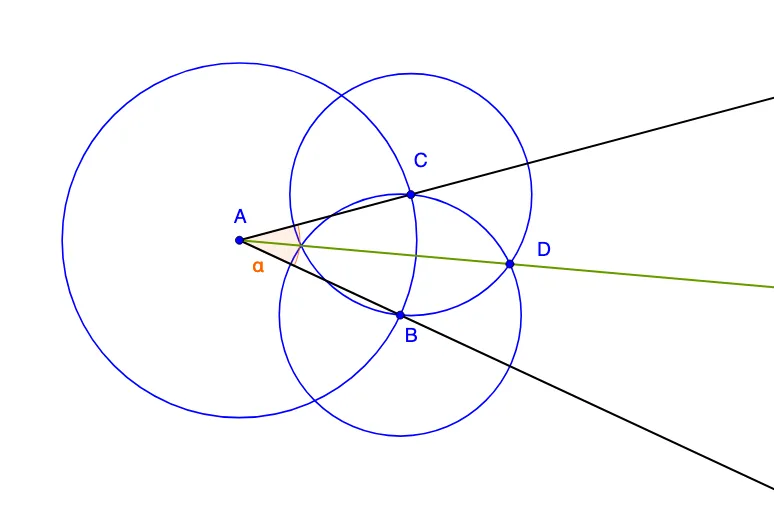
This example demonstrates how to construct the angle bisector of a given angle using classic straightedge-and-compass ideas in GeoGebra. It visually confirms the key geometric phenomenon that the bisector is characterized by equal distances/consistent intersection points created by circles. The core concepts include angle bisectors, splitting an angle into two equal angles, circle construction, and using intersection points to derive the bisector line and related ratio/symmetry reasoning. Construction highlights: Ray is used to form the two sides of the angle (with points such as A, B, and C, and ray/angle components like a, b, c, d), Angle defines the target angle (α), Circle builds auxiliary circles with chosen centers and radii (objects correspond to parameters/labels such as a, b, c, d, e, and points like D, f), and Intersect computes the key intersection points (e.g., B_1 and C_1 along with the constructed points used to finalize the bisector). Suitable for middle-to-high school geometry lessons and for teaching/practicing geometric construction and proof-oriented visualization.
GeoGebra Commands & Parameters
Ray(A, B_1) → aRay(A, C_1) → bAngle(C_1, A, B_1) → αPoint(b) → BCircle(A, B) → cIntersect(c, a, 1) → CCircle(B, C) → dCircle(C, B) → eIntersect(d, e, 2) → DRay(A, D) → f
AI Drawing Prompt Reference
Draw an angle with a common vertex and two rays extending outward as its sides. Pick a point on one side, and draw a circle centered at the vertex passing through that point; this circle intersects the other side at another point. Then draw two equal circles centered at these two intersection points with radius equal to the distance between them; these circles intersect inside the angle at a new point. Finally, draw a ray from the vertex through this new point, which bisects the original angle into two equal angles.
The prompt above was compiled from the original drawing commands and is for reference only.