
Geometric construction linking tangency with distribution visuals
Loading the math board and drawing, please wait…
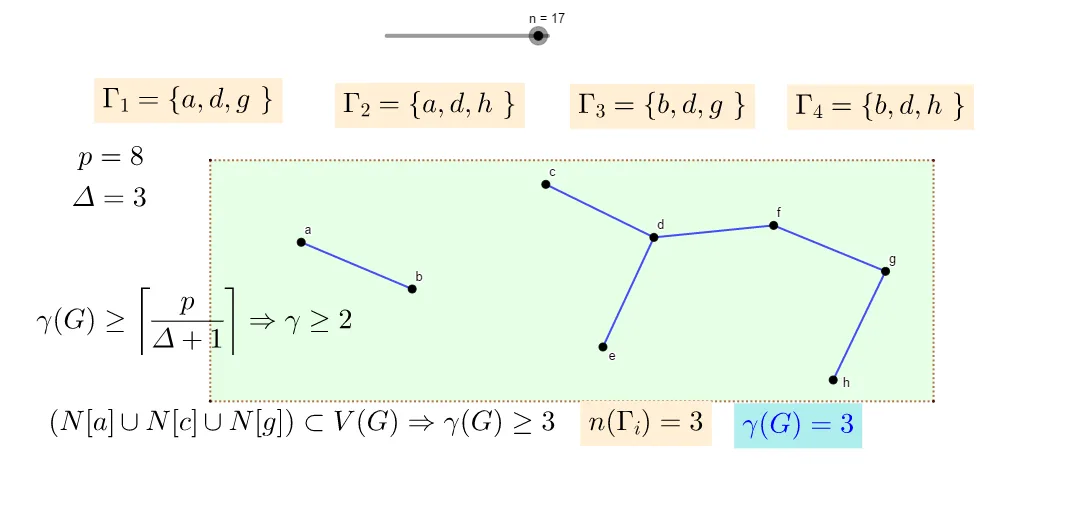
This example demonstrates a combined geometric construction where key points are connected to form foundational polygonal structures, and tangency-related relationships (as indicated by the original tags: tangent/tangent function) are incorporated so the “touching” condition can be visually inspected. The main math concepts include geometric construction using vertices and segments, the notion of a tangent line as a special contact condition, and a visualization-oriented connection to frequency/distribution-style interpretation. From the construction summary, the build primarily uses GeoGebra commands Segment and Polygon: it creates many point objects (e.g., a,b,c,d,e,f,g,h and derived points f_1,g_1,h_1, plus i,j,k,n), connects them with Segment to establish edges/supporting lines, and then uses Polygon to enclose the main regions. Numerous text/label objects (text1–text16) and named points (A,B,C,D,q1) are used to mark key steps or quantities. Suitable for middle and high school geometry instruction, class demonstrations, and self-guided exploration of tangency through geometric visualization.
GeoGebra Commands & Parameters
Segment(a, b) → f_1Segment(d, e) → g_1Segment(d, c) → h_1Segment(d, f) → iSegment(f, g) → jSegment(g, h) → kPolygon(A, B, C, D) → q1, a_1, b_1, c_1, d_1
AI Drawing Prompt Reference
Draw a quadrilateral with points A, B, C, D, and connect points a, b, c, d, e, f, g, h to form the sides of the polygon. Ensure that points f, g, h have a specific contact condition with point d, and draw segments f_1, g_1, h_1 to illustrate these contact points. Finally, use polygon q1 to enclose the entire shape.
The prompt above was compiled from the original drawing commands and is for reference only.