
Geometric Construction for the Area of a Parallelogram
Loading the math board and drawing, please wait…
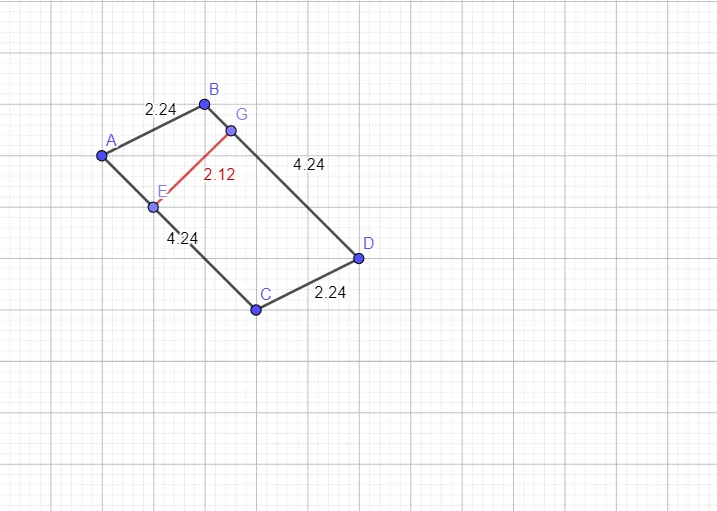
This example constructs a parallelogram in the plane and demonstrates how to obtain and verify its area-related quantities through measurable geometric lengths. It centers on the geometric meaning of parallelogram area, the use of segment and distance measurements, and supporting ideas commonly used in construction tasks such as translation or similarity relationships, along with intersection/tangent elements when needed to define the right lengths (e.g., a height expressed as a distance). In GeoGebra, the construction is built using commands like Point, Segment, and Distance to create key vertices A, B, C, D and auxiliary points (including G and E, as well as an additional point j), draw the relevant segments, and compute a specific distance such as distanceGE to serve as the crucial metric. Suitable for middle-school geometry learning and preparatory contest work, helping students connect the area concept with concrete distance-based constructions (height/length) and then relate measurements to the area formula.
GeoGebra Commands & Parameters
Segment(A, C) → fSegment(C, D) → gSegment(D, B) → hSegment(B, A) → iPoint(h) → GPoint(f) → EDistance(G, E) → distanceGESegment(E, G) → j
AI Drawing Prompt Reference
Draw a parallelogram and mark the intersection of its diagonals. From the intersection, draw a perpendicular line to one side, marking the foot of the perpendicular and connecting it to the opposite vertex. This forms two triangles. Measure and label the length of the perpendicular as the height, then calculate the area by multiplying the base length by the height. Show auxiliary lines and key points, verifying the area formula through geometric measurements.
The prompt above was compiled from the original drawing commands and is for reference only.