
Geometric Construction for Subtracting Fractions Using LCM/GCD
Loading the math board and drawing, please wait…
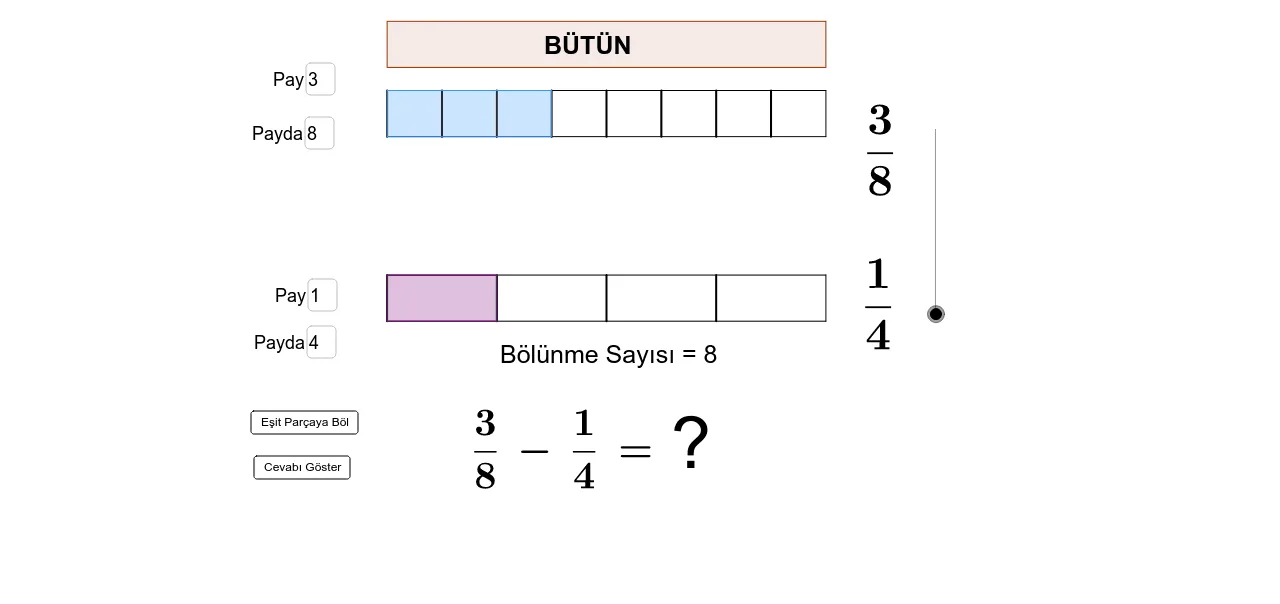
This example demonstrates how to visualize subtraction of fractions through geometric partitioning and length/area correspondence. It highlights the subtraction workflow by aligning fractions to a common denominator, then reflecting the resulting difference in constructed regions and labeled points. Key math concepts include fraction subtraction, least common multiple (LCM) for finding a shared denominator (common partition size), and greatest common divisor (GCD) for simplifying the result. The construction uses GeoGebra commands such as Sequence (to generate repeated partition structure), Segment and Polygon (to build and display the partitioned geometric pieces), Point and Intersect (to place and determine boundary points), and LCM/GCD to compute the arithmetic needed for common denominators and simplification. Textfield/LaTeX/Text are used to input and format fraction expressions, while list objects (liste1–liste6) organize intermediate values and the polygon objects (çokgen1, çokgen2) represent the geometric blocks. Suitable for middle school learning fractions (common denominator and reduction) and for classroom interactive exploration.
GeoGebra Commands & Parameters
Sequence((x(A_1) + (i * (x(C_1) - x(A_1)) / f), y(A_1)), i, 0, f) → liste3Sequence((x(B_1) + (i * (x(D_1) - x(B_1)) / f), y(D_1)), i, 0, f) → liste4Segment(A, B) → bSegment(B, D) → cSegment(A, C) → dSegment(D, C) → eSegment(A_1, B_1) → b_1Segment(B_1, D_1) → c_1Segment(A_1, C_1) → d_1Segment(D_1, C_1) → e_1Sequence((x(A) + (i * (x(C) - x(A)) / n), y(A)), i, 0, n) → liste1Sequence((x(B) + (i * (x(D) - x(B)) / n), y(D)), i, 0, n) → liste2LaTeX(f, true, true) → metin1Sequence(Segment[Element[liste1, i], Element[liste2, i]], i, 1, n) → liste5Polygon(Element[liste3, 1], Element[liste3, k + 1], Element[liste4, k + 1], Element[liste4, 1]) → çokgen1, g, h, i, jSequence(Segment[Element[liste3, i], Element[liste4, i]], i, 1, f) → liste6Polygon(Element[liste1, 1], Element[liste1, m + 1], Element[liste2, m + 1], Element[liste2, 1]) → çokgen2, l, p, q, rSequence((x(A) + (i * (x(C) - x(A)) / s), y(A)), i, 0, s) → liste7Sequence((x(B) + (i * (x(D) - x(B)) / s), y(D)), i, 0, s) → liste8Sequence(Segment[Element[liste7, i], Element[liste8, i]], i, 1, s) → liste9Sequence((x(A_1) + (i * (x(C_1) - x(A_1)) / o), y(A_1)), i, 0, o) → liste10Sequence((x(B_1) + (i * (x(D_1) - x(B_1)) / o), y(D_1)), i, 0, o) → liste11Sequence(Segment[Element[liste10, i], Element[liste11, i]], i, 1, o) → liste12Intersect(d, p) → FPoint(p) → EIntersect(d_1, h) → GPoint(h) → HPolygon(E, F, G, H) → çokgen3, e_2, f_1, g_1, h_1LCM(A2:B2) → B4Textfield(k) → MetinAlanı1Textfield(f) → MetinAlanı2Textfield(m) → MetinAlanı3Textfield(n) → MetinAlanı4GCD(A9:B9) → B10Polygon(I, J, K, L) → çokgen4, ı, j_1, k_1, l_1
AI Drawing Prompt Reference
Draw a geometric construction for subtracting fractions. Start with two rectangles, each divided into equal parts according to given numerators and denominators. Shade the regions representing the fractions. Then, using the least common multiple, repartition both rectangles into equal-sized sections to align them. Subtract the second fraction's shaded area from the first, and highlight the remaining region with a polygon. Include text fields for inputting values and labels showing the simplified result.
The prompt above was compiled from the original drawing commands and is for reference only.