
Fraction Comparison Demo: Visualizing Size with LCM and Geometric Transformation
Loading the math board and drawing, please wait…
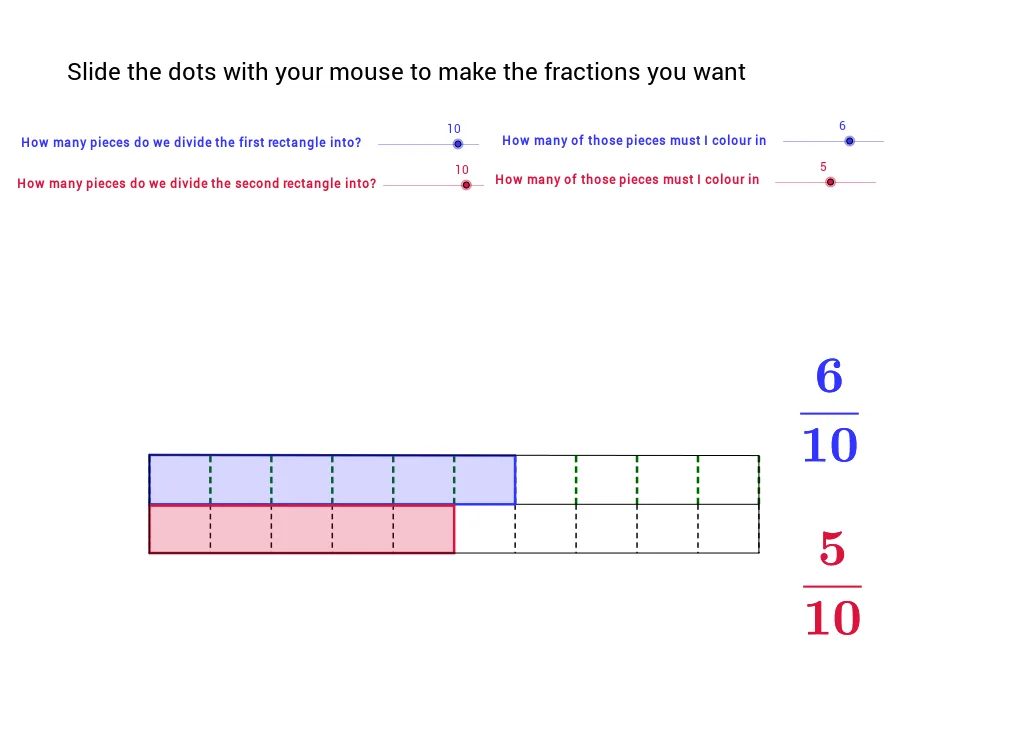
This GeoGebra applet demonstrates how to compare two fractions by visualizing their relative sizes on a number line and through geometric shapes. Core mathematical concepts include fraction comparison, least common multiple (LCM), median line/value, geometric transformations, 2D vectors, and basic distribution ideas. The construction leverages GeoGebra commands such as LCM, Sequence, Element, Segment, and Polygon, together with numerous list objects (list1‑list7), points (C, D, E, …), vectors (a, b, h, g) and polygon objects (poly1, Poly2) to create a dynamic, interactive comparison. It is suitable for middle‑school (grades 7‑9) fraction lessons, high‑school review, or as a teacher‑created instructional resource.
GeoGebra Commands & Parameters
LCM(den1, den2) → bSequence((-5 + i * 10 / den1, 0), i, 0, den1) → list1Element(list1, 1) → cSequence((-5 + i * 10 / den1, 0.8), i, 0, den1) → list2Sequence(Segment[Element[list1, i], Element[list2, i]], i, 1, den1 + 1) → list3Sequence((-5 + i * 10 / den2, 0), i, 0, den2) → list4Sequence((-5 + i * 10 / den2, -0.8), i, 0, den2) → list5Sequence((-5 + i * 10 / b, 0), i, 0, b) → list7Sequence(Segment[Element[list4, i], Element[list5, i]], i, 0, den2 + 1) → list6Segment(D, C) → aPolygon(E, F, J_1, K_1) → poly1, e, f, j_1, k_1Polygon(H, G, K_2, J_2) → Poly2, h, g, k_2, j_2Segment(J_1, K_11) → dSegment(J_1, K_2) → iSegment(K_2, K) → jSegment(K_11, K) → k
AI Drawing Prompt Reference
On a horizontal number line from -5 to 5, divide the interval according to two denominators and draw vertical segments for each unit fraction; then subdivide the same interval by the least common multiple of the denominators to create a finer grid. Using vector translations and rotations, construct two polygons that cover the lengths representing the two fractions, and add connecting segments to show their common boundary and median line, giving a clear visual comparison of the fraction sizes.
The prompt above was compiled from the original drawing commands and is for reference only.