
Geometric construction between pentagons
Loading the math board and drawing, please wait…
In collections
geometriadinamica.es
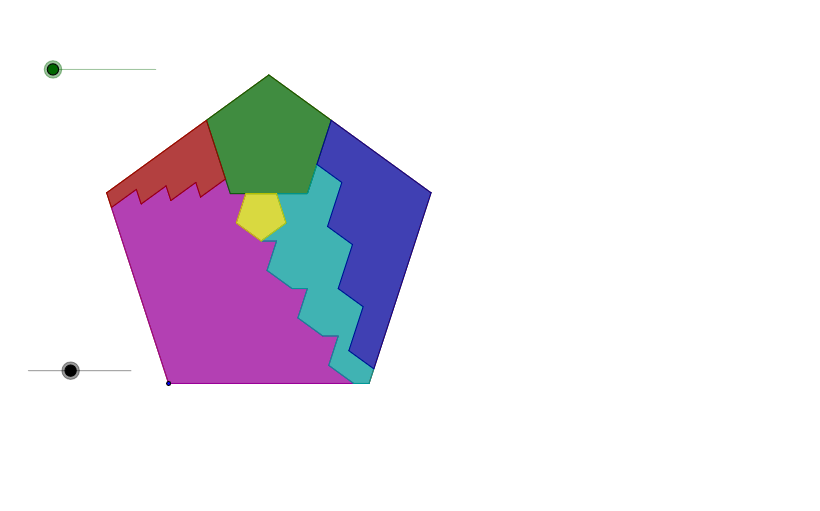
This example demonstrates how to construct an embedded, chain-like geometric configuration between multiple pentagons using circle intersections, rays, and a sequence of transformations. It highlights key ideas such as polygon vertex construction (pentagons), how circle–line/ray intersections determine critical points, and how angles and symmetries guide the layout. The construction uses GeoGebra commands including Circle, Ray, Intersect, Rotate, LineBisector (angle bisector), Mirror (reflection), Polygon, Vector, Line, Midpoint, and Translate. A set of geometric objects (e.g., points labeled like a, A, B, C, D, e–h and their indexed counterparts such as a_1, b_1, c_1, d_1, e_1, f_1) is created and connected so that each transformed pentagon shares consistent geometric relationships with the next. Suitable for secondary-school geometry, teaching transformation-based construction, and for students learning rigorous geometric modeling.
GeoGebra Commands & Parameters
Circle(A, i) → kCircle(A, c) → dRay(A, B) → bIntersect(d, b, 1) → CRotate(A, 252°, C) → DCircle(C, A) → eCircle(A, f) → gLineBisector(A, C) → hRotate(C, 252°, D) → EMirror(D, h) → FPolygon(A, F, E, D, C) → P, a_1, f_1, e_1, d_1, c_1Intersect(k, c_1, 1) → HVector(C, H) → z_1Circle(C, H) → h_1Intersect(h_1, d_1) → W,Vector(W, C) → v_3Circle(E, j) → pIntersect(k, a_1, 1) → GIntersect(p, f_1, 1) → IIntersect(p, e_1, 1) → JLine(J, d_1) → lLine(I, a_1) → mCircle(I, n) → qIntersect(q, m, 2) → KLine(K, c_1) → rIntersect(r, l) → LPolygon(I, K, L, J, E) → Q, i_1, k_1, l_1, j_1, e_2Midpoint(G, K) → MMidpoint(G, M) → NMidpoint(M, K) → OLine(N, a_1) → tVector(G, N) → uTranslate(F, u) → RTranslate(R, u) → STranslate(S, u) → TTranslate(T, u) → UPolygon(F, G, R, N, S, M, T, O, U, I) → V, f_2, i_2, g_1, r_1, n_1, s, m_1, t_1, o, u_1Midpoint(J, W) → YMidpoint(Y, W) → ZMidpoint(Y, J) → A_1Line(A_1, e_1) → b_1Intersect(b_1, l) → B_1Vector(J, A_1) → vTranslate(B_1, v) → C_1Translate(C_1, v) → D_1Translate(D_1, v) → E_1Polygon(D, W, E_1, Z, D_1, Y, C_1, A_1, B_1, J) → P_1, d_2, j_2, w, e_3, z, d_3, y, c_2, a_2, b_2Vector(W, E_1) → v_1Vector(L, B_1) → w_1Translate(H, v_1) → F_1Translate(F_1, w_1) → G_1Translate(G_1, z_1) → H_1Translate(H_1, v_1) → I_1Translate(I_1, w_1) → J_1Translate(J_1, z_1) → K_1Translate(K_1, v_1) → L_1Translate(L_1, w_1) → M_1Translate(M_1, z_1) → N_1Translate(N_1, v_1) → O_1Translate(O_1, w_1) → Q_1Midpoint(Q_1, L) → R_1Line(N_1, e_2) → q_1Line(R_1, a_1) → p_1Intersect(p_1, q_1) → S_1Polygon(Q_1, O_1, N_1, S_1, R_1) → T_1, q_2, o_1, n_2, s_1, r_2Polygon(N_1, M_1, C, W, E_1, Z, D_1, Y, C_1, A_1, B_1, L, L_1, R_1, S_1, K_1, J_1, I_1, H_1, G_1, F_1, H) → U_1, n_3, h_3, c_3, w_2, e_4, z_2, d_4, y_1, c_4, a_3, b_3, m_2, l_3, r_3, s_2, l_2, k_2, j_3, i_3, h_2, g_2, f_3Polygon(A, H, N_1, O_1, Q_1, K, U, O, T, M, S, N, F_1, R, G, G_1, H_1, I_1, J_1, K_1, L_1, M_1) → V_1, a_4, m_3, n_4, o_2, q_3, k_4, u_2, o_3, t_2, m_4, s_3, h_4, n_5, r_4, g_4, f_4, g_3, h_5, i_4, j_4, k_3, l_4Rotate(I, ((-a) * 180°), D) → I'Rotate(K, ((-a) * 180°), D) → K'Rotate(L, ((-a) * 180°), D) → L'Rotate(J, ((-a) * 180°), D) → J'Rotate(E, ((-a) * 180°), D) → E'Polygon(I', K', L', J', E') → Q', i', k', l', j', e'Rotate(I', ((-a) * 36°), E') → I''Rotate(K', ((-a) * 36°), E') → K''Rotate(L', ((-a) * 36°), E') → L''Rotate(J', ((-a) * 36°), E') → J''Rotate(E', ((-a) * 36°), E') → E''Polygon(I'', K'', L'', J'', E'') → Q'', i'', k'', l'', j'', e''Translate(F, v_2) → F'Translate(G, v_2) → G'Translate(R, v_2) → R'Translate(N, v_2) → N'Translate(S, v_2) → S'Translate(M, v_2) → M'Translate(T, v_2) → T'Translate(O, v_2) → O'Translate(U, v_2) → U'Translate(I, v_2) → I'_1Polygon(F', G', R', N', S', M', T', O', U', I'_1) → V', f', i'_1, g', r', n', s', m', t', o', u'Midpoint(I'_1, S_1) → W_1Translate(N_1, p_2) → N_2Translate(M_1, p_2) → M_1'Translate(L_1, p_2) → L_1'Translate(K_1, p_2) → K_1'Translate(J_1, p_2) → J_1'Translate(I_1, p_2) → I_1'Translate(H_1, p_2) → H_1'Translate(G_1, p_2) → G_1'Translate(F_1, p_2) → F_1'Translate(H, p_2) → H'Translate(C, p_2) → C'Translate(W, p_2) → W'Translate(E_1, p_2) → E_1'Translate(Z, p_2) → Z'Translate(D_1, p_2) → D_1'Translate(Y, p_2) → Y'Translate(C_1, p_2) → C_1'Translate(A_1, p_2) → A_1'Translate(B_1, p_2) → B_1'Translate(L, p_2) → L'_1Translate(R_1, p_2) → R_2Translate(S_1, p_2) → S_2Polygon(N_2, M_1', C', W', E_1', Z', D_1', Y', C_1', A_1', B_1', L'_1, L_1', R_2, S_2, K_1', J_1', I_1', H_1', G_1', F_1', H') → U_1', n_6, h', c', w', e_1', z', d_1', y', c_1', a_1', b_1', m_1', l'_1, r_5, s_4, l_1', k_1', j_1', i_1', h_1', g_1', f_1'Translate(D, u_3) → D'Translate(W, u_3) → W'_1Translate(E_1, u_3) → E_2Translate(Z, u_3) → Z'_1Translate(D_1, u_3) → D_2Translate(Y, u_3) → Y'_1Translate(C_1, u_3) → C_2Translate(A_1, u_3) → A_2Translate(B_1, u_3) → B_2Translate(J, u_3) → J'_1Polygon(D', W'_1, E_2, Z'_1, D_2, Y'_1, C_2, A_2, B_2, J'_1) → P_1', d', j'_1, w'_1, e_5, z'_1, d_5, y'_1, c_5, a_5, b_4Rotate(Q_1, ((-a) * 180°), W_1) → Q_1'Rotate(O_1, ((-a) * 180°), W_1) → O_1'Rotate(N_1, ((-a) * 180°), W_1) → N_1'Rotate(S_1, ((-a) * 180°), W_1) → S_1'Rotate(R_1, ((-a) * 180°), W_1) → R_1'Polygon(Q_1', O_1', N_1', S_1', R_1') → T_1', q_1', o_1', n_1', s_1', r_1'
AI Drawing Prompt Reference
Draw a chain-like geometric figure composed of multiple pentagons. Each pentagon is positioned using circle intersections, rays, and rotations. Symmetry is ensured through angle bisectors and reflections. The construction order is: first create circles and rays to find intersection points and rotate them; then use angle bisectors and reflections to generate new points; next construct the first pentagon with these points. Then use vectors and lines to find other intersections and construct the second pentagon. Finally, use midpoints and translations to generate larger pentagons. The final figure connects pentagons through shared geometric relationships, forming a coherent chain.
The prompt above was compiled from the original drawing commands and is for reference only.