
Geometric Construction and Graphing Example
Loading the math board and drawing, please wait…
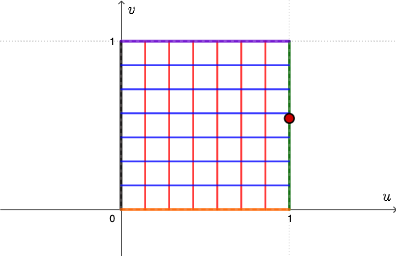
This example demonstrates how to understand the properties of trigonometric functions through geometric construction and graphing. Key mathematical concepts include trigonometry, geometric construction, and coordinate geometry. Construction involves using GeoGebra commands such as Polygon, Sequence, Point, Derivative, etc. Suitable for high school students or college freshmen to learn foundational knowledge in geometry and calculus.
GeoGebra Commands & Parameters
Polygon(A, B, 4) → square, f, g, h, i, C, DSequence(Segment[A + (i * (B - A) / n), D + (i * (C - D) / n)], i, 0, n) → verticalPoint(Element[vertical, 1]) → A1Derivative(u, x) → uxDerivative(u, y) → uyDerivative(v, x) → vxDerivative(v, y) → vySequence(Segment[A + (i * (D - A) / n), B + (i * (C - B) / n)], i, 0, n) → horizontalPoint(Element[vertical, 2]) → A2Point(Element[vertical, 3]) → A3Point(Element[vertical, 4]) → A4Point(Element[vertical, 5]) → A5Point(Element[vertical, 6]) → A6Point(Element[vertical, 7]) → A7Point(Element[vertical, 8]) → A8Point(Element[horizontal, 1]) → B1Point(Element[horizontal, 2]) → B2Point(Element[horizontal, 3]) → B3Point(Element[horizontal, 4]) → B4Point(Element[horizontal, 5]) → B5Point(Element[horizontal, 6]) → B6Point(Element[horizontal, 7]) → B7Point(Element[horizontal, 8]) → B8Locus(C1, A1) → E1Locus(C2, A2) → E2Locus(C3, A3) → E3Locus(C4, A4) → E4Locus(C5, A5) → E5Locus(C6, A6) → E6Locus(C7, A7) → E7Locus(C8, A8) → E8Locus(D1, B1) → F1Locus(D2, B2) → F2Locus(D3, B3) → F3Locus(D4, B4) → F4Locus(D5, B5) → F5Locus(D6, B6) → F6Locus(D7, B7) → F7Locus(D8, B8) → F8Textfield(u) → InputBox1Textfield(v) → InputBox2Point(square) → E
AI Drawing Prompt Reference
Draw a coordinate-geometry construction based on a square. First construct the square and label its vertices. Then divide the square’s relevant sides into equal parts to create a set of evenly spaced vertical-reference points, and similarly create a set of evenly spaced horizontal-reference points. Use the corresponding reference points to define additional points in the interior, positioned by the vertical and horizontal relations. For each vertical-reference point, build a trajectory curve determined by a corresponding fixed point on the square; repeat this to obtain multiple locus/trajectory curves for the horizontal-reference points as well. Include two input fields to represent two parameters used by the construction that relate to the generated curves.
The prompt above was compiled from the original drawing commands and is for reference only.