
GeoGebra Perpendicular Lines Construction Demo
Loading the math board and drawing, please wait…
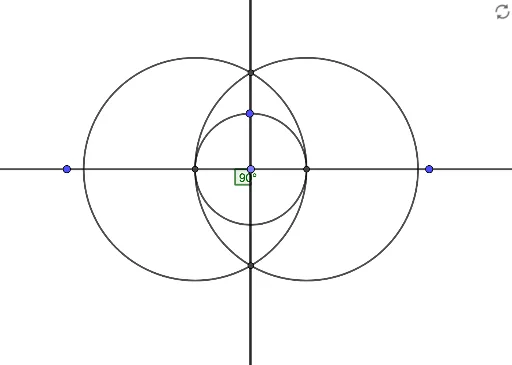
This GeoGebra example demonstrates how to create two perpendicular lines. The construction uses Line command for basic straight lines, Point command to set key points, OrthogonalLine command to generate perpendicular lines, Circle command for auxiliary circles to determine intersection points, Intersect command to find intersection coordinates, and Angle command to verify the 90-degree angle between lines. The construction involves four fundamental geometric objects: points, lines, circles, and angles, covering coordinate systems and orthogonal relationships. Ideal for middle school math teachers demonstrating perpendicular concepts, students exploring properties and construction methods of perpendicular lines, and as a visual aid for introductory coordinate geometry learning.
GeoGebra Commands & Parameters
Line(A, B) → fPoint(f) → COrthogonalLine(D, f) → gCircle(C, D) → cIntersect(c, f, 1) → EIntersect(c, f, 2) → FCircle(E, F) → dCircle(F, E) → eIntersect(d, e, 1) → GIntersect(d, e, 2) → HLine(G, H) → hAngle(A, C, H) → α