
GeoGebra Model of Discrete Logarithm (One-Way Function)
Loading the math board and drawing, please wait…
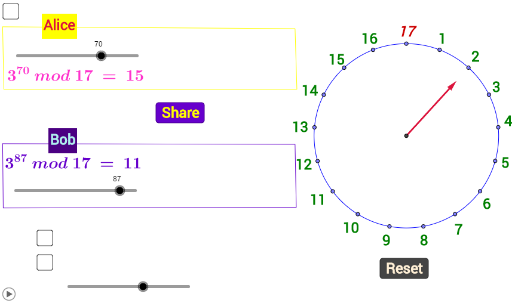
① This GeoGebra example dynamically visualizes the discrete logarithm as a one-way function, illustrating the computational difficulty of finding the exponent given a base and result in a finite cyclic group. ② Core mathematical concepts include discrete logarithm, one-way functions, modular arithmetic, exponential and logarithmic relationships, and random point rotations within a cyclic structure. ③ Construction highlights: using commands such as Intersect, Point, Rotate, Circle, Random, Ray, Vector, and Polygon, the model creates multiple labeled points (e.g., B'_0 through B'_14) and random rays/vectors, with sliders n and rez controlling parameters, and text objects displaying numerical outputs for interactive exploration. ④ Suitable for high school to university students studying cryptography, number theory, or abstract algebra, and for instructors demonstrating the essence of one-way functions and the discrete logarithm problem, which underpins public-key cryptography.
GeoGebra Commands & Parameters
Intersect(xAxis, yAxis) → APoint(yAxis) → BRotate(B, 21.18°, A) → B'_0Rotate(B'_0, 21.18°, A) → B'_1Rotate(B'_1, 21.18°, A) → B'_2Rotate(B'_2, 21.18°, A) → B'_3Rotate(B'_3, 21.18°, A) → B'_4Rotate(B'_4, 21.18°, A) → B'_5Circle(A, B) → cRandom(0, 100) → numberRandom(0, 100) → number_1Circle(A, D) → dRay(A, B) → aVector(A, D) → uRotate(B'_5, 21.18°, A) → B'_6Rotate(B'_6, 21.18°, A) → B'_7Rotate(B'_7, 21.18°, A) → B'_8Rotate(B'_8, 21.18°, A) → B'_9Rotate(B'_9, 21.18°, A) → B'_{10}Rotate(B'_{10}, 21.18°, A) → B'_{11}Rotate(B'_{11}, 21.18°, A) → B'_{12}Rotate(B'_{12}, 21.18°, A) → B'_{13}Rotate(B'_{13}, 21.18°, A) → B'_{14}Rotate(B'_{14}, 21.18°, A) → B'_{15}Point(d) → CRotate(u, (-(((rez * 21.18))°)), A) → vVector(E, F) → wVector(G, H) → bPolygon(I, J, K, L) → многокутник1, i, j, k, lPolygon(M, N, O, P) → многокутник2, m, n_1, o, p
AI Drawing Prompt Reference
Draw a circle centered at the origin with multiple marked points evenly spaced along its circumference, each successive point rotated by about 21 degrees from the previous one, forming a discrete rotation sequence. Add a smaller concentric circle with a random point on it, and draw a ray and a vector from the center to that point. Include two polygonal regions, each defined by four vertices, with random vectors attached. The overall layout illustrates the discrete logarithm relationship between exponent and result, with a slider controlling the rotation step and numerical values displayed.
The prompt above was compiled from the original drawing commands and is for reference only.