
GeoGebra Geometric Construction: Triangle Symmetry and Median Line
Loading the math board and drawing, please wait…
In collections
Area of a Triangle: Intuitive Discovery
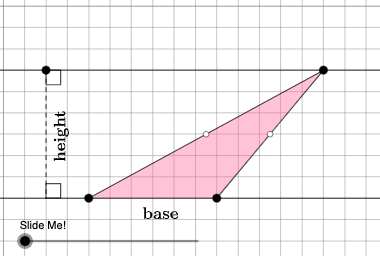
This example demonstrates how to analyze triangle symmetry and median lines using geometric constructions. Key mathematical concepts include logarithms, median lines, symmetry, mode, and perimeter. Construction involves using GeoGebra commands like Point, Polygon, OrthogonalLine, and Midpoint to create triangles, determine median line positions, and analyze symmetry. Suitable for middle school students learning geometric constructions and symmetry concepts, also useful for high school math teaching support.
GeoGebra Commands & Parameters
Point(Ray[A, A + (1, 0)]) → BPointIn(d) → CPolygon(A, B, C) → t1, f, a, bOrthogonalLine(C, g) → hIntersect(g, h) → C_{1}Midpoint(C, C_{1}) → DMidpoint(b) → EMidpoint(a) → GDilate(C, If[0 < c ≤ 1, 1 - c, 0], D) → F'Segment(C, F') → iDilate(D, If[1 < c ≤ 2, 2 - c, 0], C_{1}) → D'Segment(D, D') → jRotate(C, If[2 < c ≤ 3, ((c - 2) * pi), pi], D) → F'_{1}Rotate(F', If[2 < c ≤ 3, ((c - 2) * pi), pi], D) → F''Segment(F'_{1}, F'') → i'Dilate(E, If[0 < c ≤ 2, (0.5 * (2 - c)), 0], D) → E'Segment(E, E') → kDilate(G, If[0 < c ≤ 2, (0.5 * (2 - c)), 0], D) → G'Segment(G, G') → lAngle(C, B, A) → βAngle(B, A, C) → γPolygon(A, B, G, E) → q1, a_1, b_1, g_1, ePolygon(G, C, E) → t2, e_1, g_2, f_1Rotate(G, If[4 < c ≤ 5, ((c - 4) * pi), pi], E) → G'_{1}Rotate(C, If[4 < c ≤ 5, ((c - 4) * pi), pi], E) → F'_{2}Rotate(E, If[4 < c ≤ 5, ((c - 4) * pi), pi], E) → E'_{1}Polygon(G'_{1}, F'_{2}, E'_{1}) → t2', e'_{1}, g'_{1}, f'_{2}Segment(A, E) → mSegment(B, G) → nSegment(G, C) → pSegment(C, E) → qSegment(F'_{2}, E) → rSegment(E, G'_{1}) → sSegment(G'_{1}, F'_{2}) → tSegment(G, C) → h_1Segment(C, E) → i_1If(β ≟ pi / 2, 5, 8) → oOrthogonalLine(B, p_1) → j_1Intersect(p_1, j_1) → HOrthogonalLine(G, g) → k_1Intersect(k_1, g) → IDilate(G, If[5 < c ≤ 6, 6 - c, 0], I) → G'_{2}Segment(G, G'_{2}) → l_1Polygon(A, I, G, G'_{1}) → q2, a_2, i_2, g_3, m_1Polygon(I, B, G) → t3, g_4, i_3, b_2Dilate(G, If[7 < c ≤ 8, 8 - c, 0], G'_{1}) → G'_{3}Vector(G, G'_{3}) → uTranslate(I, u) → I'Translate(B, u) → B'Translate(G, u) → G'_{4}Polygon(I', B', G'_{4}) → t3', g'_{4}, n_1, b'Segment(G'_{3}, I') → q_1Segment(G'_{3}, B') → r_1Dilate(B, If[5 < c ≤ 6, 6 - c, 0], H) → H'Polygon(A, B, H, G'_{1}) → q3, a_3, b_3, h_2, t_1Polygon(B, H, G) → t4, g_5, b_4, h_3Translate(B, u) → B'_{1}Translate(H, u) → H'_{1}Translate(G, u) → G'_{5}Polygon(B'_{1}, H'_{1}, G'_{5}) → t4', g'_{5}, b'_{1}, h'_{1}Segment(B'_{1}, G'_{3}) → c_1Segment(B'_{1}, H'_{1}) → d_1Segment(B, H') → s_1Point(Line[A, B]) → FPoint(f_2) → JIntersect(eq1, Line[A, B]) → KSegment(J, K) → j_2Point(Line[A, B]) → LAngle(L, K, J) → αAngle(K, J, C) → δRotateText(text2, pi / 2) → text3
AI Drawing Prompt Reference
Construct a triangle from three given vertices, where two vertices are determined from a point and a ray, and the third vertex lies on a line. Draw the triangle and then form a median: drop an orthogonal from the chosen vertex to the corresponding line, take the midpoint between the vertex and the orthogonal foot, and connect to obtain the median segment. Also mark the midpoints on the other two sides. Use rotation about relevant centers defined by angle positions to move the midpoint-related points into new locations, connecting the rotated points to form additional triangular regions and segments. Determine a perpendicular direction based on whether a key angle is right, draw orthogonal lines and their intersections, then form further segments and translate a final key point using the vector between two constructed points to obtain the matching translated configuration.
The prompt above was compiled from the original drawing commands and is for reference only.