
GeoGebra Example: Checking Angle Sum to 180 Degrees
Loading the math board and drawing, please wait…
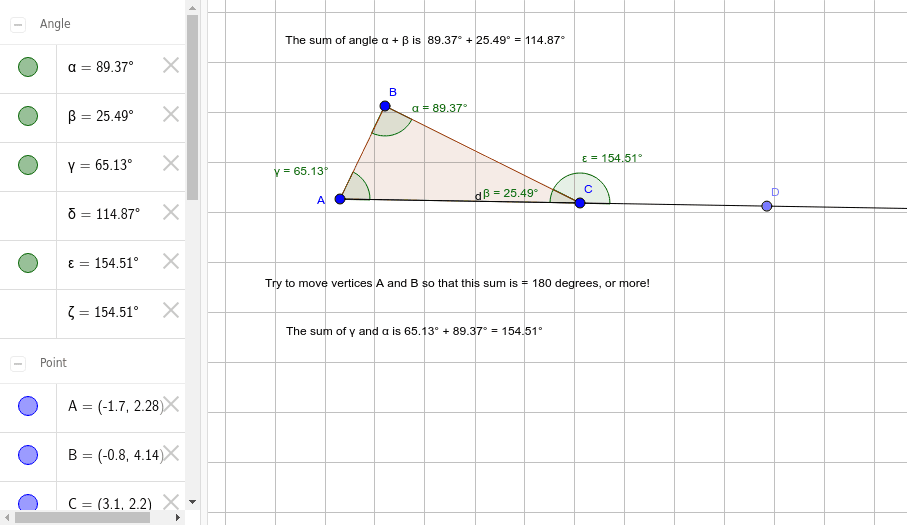
This example demonstrates how to dynamically verify whether the sum of two angles can reach 180 degrees or the 'sum of two right angles' using GeoGebra. It involves core concepts like angles, geometric construction, and Euclidean geometry. Key GeoGebra commands used include Polygon, Ray, Point, and Angle for constructing the figure. Suitable for high school mathematics teaching or exploration by geometry enthusiasts.
GeoGebra Commands & Parameters
Polygon(A, B, C) → poly1, c, a, bRay(A, C) → dPoint(d) → DAngle(A, B, C) → αAngle(B, C, A) → βAngle(C, A, B) → γAngle(D, C, B) → ε
AI Drawing Prompt Reference
Draw a triangle and extend one of its sides as a ray. Let the ray intersect the opposite side at a point. Measure the angles of the triangle and the angle formed by the ray and the two sides, verifying that their sum equals 180 degrees to demonstrate the angle sum property and geometric construction.
The prompt above was compiled from the original drawing commands and is for reference only.