
Chord and Diameter: Geometric Construction in a Circle
Loading the math board and drawing, please wait…
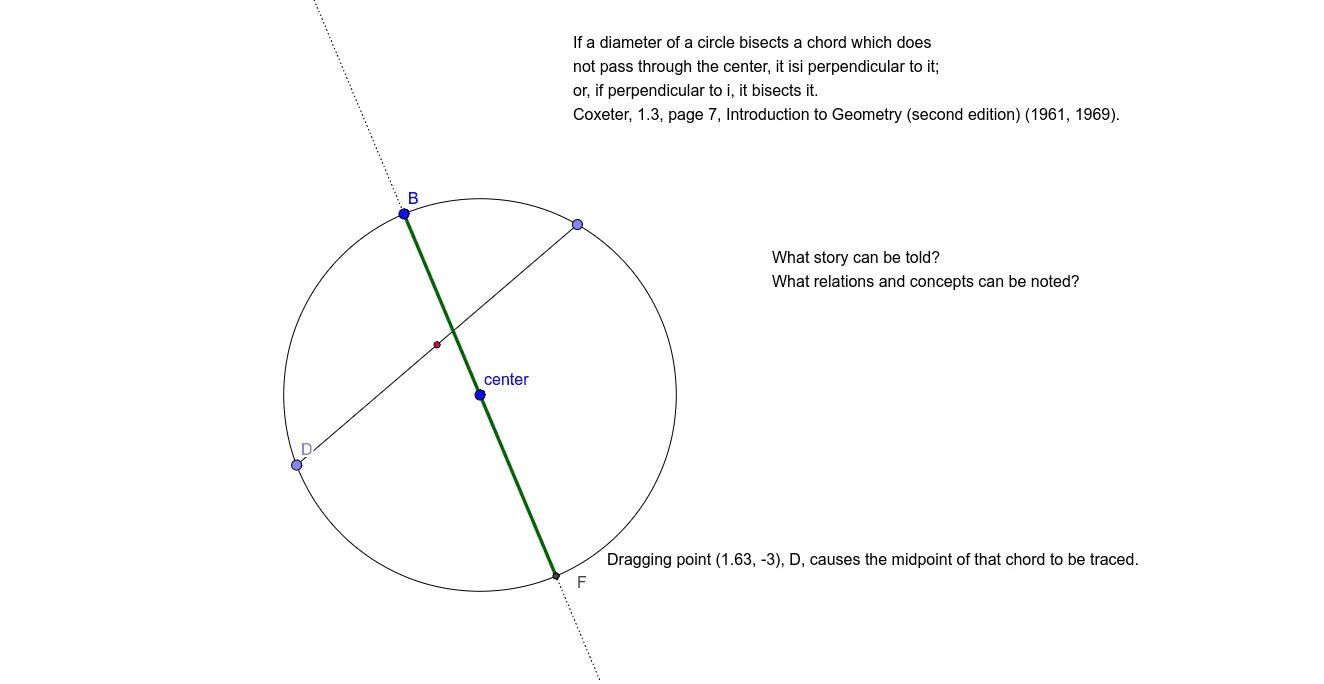
① This example illustrates the geometric relationship between a chord and a diameter in a circle, demonstrating that the perpendicular bisector of a chord passes through the circle's center and that the diameter bisects the chord. ② Core mathematical concepts include circle elements (center, radius, diameter, chord), the chord bisector theorem, midpoint and perpendicularity, and segment proportions. ③ Construction uses GeoGebra commands: Circle, Line, Point, Segment, Midpoint, Intersect, with text objects for labeling key points. ④ Suitable for middle and high school students and teachers learning circle properties, geometric proofs, or using dynamic geometry for exploration and demonstration.
GeoGebra Commands & Parameters
Circle(A, B) → cLine(B, A) → fPoint(c) → CPoint(c) → DSegment(C, D) → gMidpoint(g) → EIntersect(c, f, 2) → FSegment(B, F) → hSegment(B, F) → i
AI Drawing Prompt Reference
Draw a circle with a center point and a point on the circumference, connecting them to form a diameter. Choose two other points on the circle and connect them to create a chord. Find the midpoint of this chord, then draw a line through the center and this midpoint, intersecting the circle at another point. Connect the center to this intersection point to form a radius. Also connect the center to both endpoints of the chord. Clearly label the center, diameter, chord, chord midpoint, intersection point, and all segments, illustrating that the diameter perpendicularly bisects the chord.
The prompt above was compiled from the original drawing commands and is for reference only.