
GeoGebra Ellipse Locus: Circles, Intersections, and Locus Equations
Loading the math board and drawing, please wait…
In collections
Locus Line Equations demos
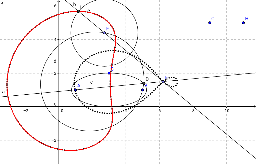
This GeoGebra example demonstrates an ellipse-related locus phenomenon, showing how intersections of lines, circles, and ellipses generate a traceable path and its equation. The core mathematical ideas include circle and ellipse geometry, intersection construction, locus and locus equations, geometric mean and rectangle proportion relationships, with connections to frequency distribution, conditional probability, and sine functions. In construction, Point creates key objects A, B, C, D, E, F, G, H, and I; Line connects selected points to form constraints; Circle and Ellipse build the basic curves; Intersect finds curve intersections; Locus and LocusEquation produce the displayed trace loc1 and equation f. It is suitable for secondary-school mathematics exploration, analytic geometry lessons, probability and statistics integration, and GeoGebra locus demonstrations.
GeoGebra Commands & Parameters
Ellipse(A, B, C) → cEllipse(C, A, B) → dIntersect(c, d, 1) → DLine(A, D) → aPoint(a) → EPoint(d) → FLine(F, E) → bCircle(F, Segment[G, H]) → eIntersect(e, b, 1) → ILocus(I, F) → loc1LocusEquation(I, F) → f
AI Drawing Prompt Reference
Draw an ellipse-related figure with two ellipses, their intersection point, a line, a circle, and a point. The construction order is to draw the ellipses first, find their intersection, connect the intersection to form a line, draw a circle, and then generate the trajectory from the point.
The prompt above was compiled from the original drawing commands and is for reference only.