
GeoGebra Custom Tool: Constructing Geometry with Perpendicular Lines and Interse
Loading the math board and drawing, please wait…
In collections
学习 GeoGebra 经典应用
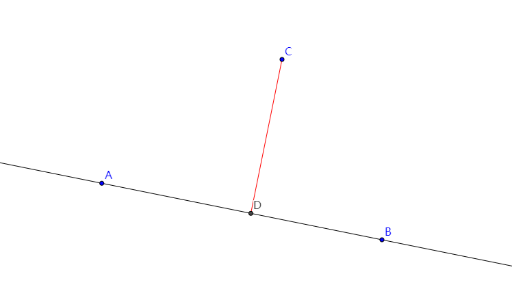
This example demonstrates how to create and use a GeoGebra custom tool that packages a sequence of construction steps into reusable actions. It builds geometric elements by enforcing perpendicularity and then extracting key points through intersections. The central ideas are geometric construction (perpendicular lines via OrthogonalLine), object construction with primitives (Line and Segment), and determining intersection points with Intersect. In the construction, the commands Line, OrthogonalLine, Intersect, and Segment are combined to produce a structured set of objects (A, B, a, C, b, D, c), illustrating how inputs and outputs can be connected in a custom workflow. Suitable for middle and high school geometry practice, as well as for teaching GeoGebra tool creation and dependency-based modeling.
GeoGebra Commands & Parameters
Line(A, B) → aOrthogonalLine(C, a) → bIntersect(a, b) → DSegment(C, D) → c
AI Drawing Prompt Reference
Draw a right triangle by creating a line a through point C, then create a perpendicular line b to line a, and find their intersection point D. Finally, connect point C and point D.
The prompt above was compiled from the original drawing commands and is for reference only.