
GeoGebra Construction of Polylines and Line Segments (PolyLine)
Loading the math board and drawing, please wait…
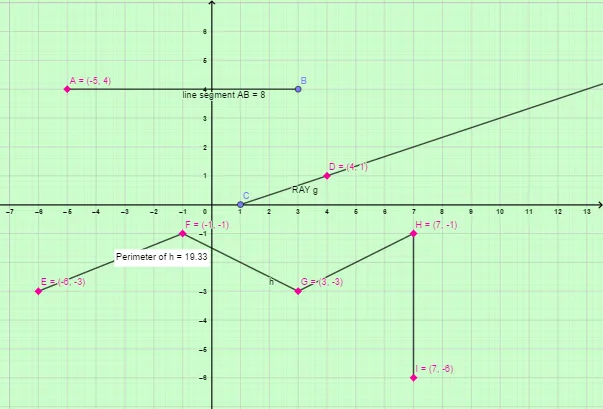
This example demonstrates how to construct a polyline in GeoGebra by connecting multiple given points with straight line segments, forming a piecewise-linear path. The key mathematical ideas include line segments (Segment), rays (Ray) for directed straight paths, and polylines (PolyLine) built by ordered point connections, where the sequence of points determines the overall shape. Construction focuses on creating points (Point) such as A, B, C, D, E, F, G, H, I; generating segment geometry with Segment; optionally defining rays with Ray; and then using PolyLine to connect points into composite line objects (e.g., f, g, h). The setup also includes text/object labeling (Texth, Pointh) to annotate points and constructions. Suitable for middle school to high school geometry, and for instruction/practice on drawing rules and piecewise-linear figures.
GeoGebra Commands & Parameters
Point(Circle[A, 8]) → BSegment(A, B) → fPoint(xAxis) → CRay(C, D) → gPolyLine(E, F, G, H, I) → hPoint(h) → Pointh
AI Drawing Prompt Reference
Draw a polyline formed by connecting several points in sequence. Start by placing a circle with a center, then pick a point on its circumference and connect the center to that point with a line segment. Next, choose a point on the horizontal axis and draw a ray starting from that point. Then select five points and connect them in order with a polyline, creating a piecewise-linear path. Finally, place a point on the polyline and label it. The figure includes a segment, a ray, and a polyline, with positions determined by the chosen points.
The prompt above was compiled from the original drawing commands and is for reference only.