
General Cubic Function: Derivatives, Integrals, and Osculating Circles
Loading the math board and drawing, please wait…
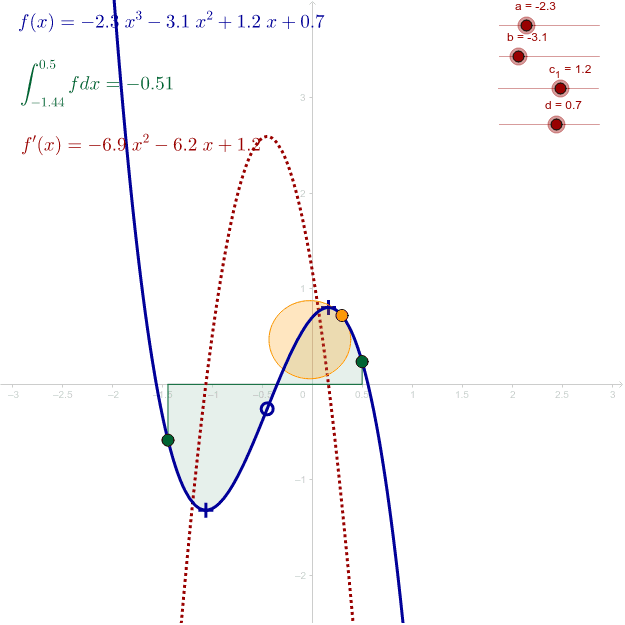
This interactive GeoGebra example dynamically illustrates a general cubic function f(x)=ax³+bx²+cx+d using sliders and draggable points. It demonstrates the graph of the cubic, its derivative, extrema, inflection point, definite integral area, curvature vectors, and osculating circles. Core mathematical concepts include polynomial functions, derivatives, turning points, inflection points, definite integrals, curvature, and osculating circles. The construction uses GeoGebra commands such as TurningPoint, Extremum, InflexionPoint, Point, If, Integral, CurvatureVector, and Circle. Sliders a, b, c, d adjust the coefficients; green points set the integration limits; a yellow point moves along the curve to explore different osculating circles. Suitable for high school and university students learning calculus, function analysis, and differential geometry, as well as for classroom demonstrations and self-study.
GeoGebra Commands & Parameters
TurningPoint(f) → InflexionPointExtremum(f) → A, BPoint(f) → CPoint(f) → DIf(x(C) < x(D), x(C), x(D)) → startIf(x(C) < x(D), x(D), x(C)) → stopIntegral(f, start, stop) → ePoint(f) → ECurvatureVector(E, f) → cCircle(M, E) → g
AI Drawing Prompt Reference
Draw a graph of a general cubic function with coefficients controlled by four sliders. Show the cubic curve, its derivative, two extrema, one inflection point, and a shaded definite integral area between two draggable points on the curve. Also include a moving point on the curve with its curvature vector and an osculating circle. The layout should clearly illustrate the relationships among the function, derivative, extrema, inflection, integral area, and curvature circle.
The prompt above was compiled from the original drawing commands and is for reference only.