
Front, Side and Top View with Angles
Loading the math board and drawing, please wait…
In collections
Cuboids & their Nets
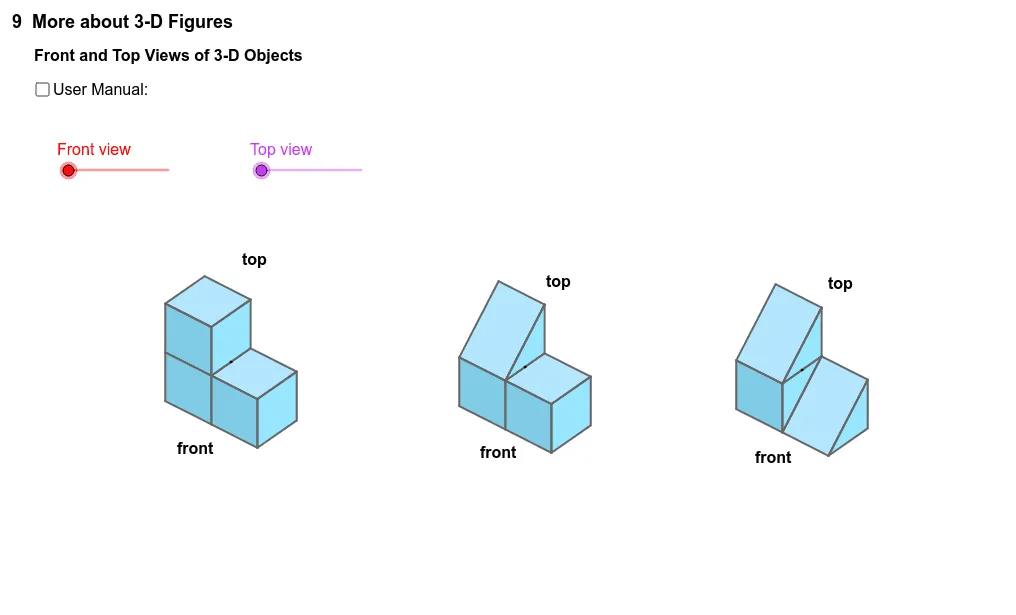
This example demonstrates the relationship between the front, side, and top views and angles. Key mathematical concepts include similar triangles and angles. Using GeoGebra commands such as Circle, Point, Angle, Segment, Vector, and Polygon, the front, side, and top views are constructed. Suitable for students in middle school and above to learn solid geometry and angle relationships.
GeoGebra Commands & Parameters
Circle(rotateUDc, rotateUD0) → dPoint(d) → rotateUDAngle(rotateUD0, rotateUDc, rotateUD) → βCircle(rotateLRc, rotateLR0) → cPoint(c) → rotateLRAngle(rotateLR0, rotateLRc, rotateLR) → αSegment(rotateLRc, rotateLR0) → aSegment(rotateLRc, rotateLR) → bSegment(rotateUDc, rotateUD0) → eSegment(rotateUDc, rotateUD) → fVector(O, O + (0.0, sin(β + δ * front - β * top))) → OzVector(O, O + (-1.0 * 1.0 * 1.0 * 1.0 * 1.0 * 1.0 * 1.0 * 1.0 * 1.0 * sin(α + γ * front + γ * top), cos(α + γ * front + γ * top) * cos(β + δ * front - β * top))) → OyVector(O, O + (cos(α + γ * front + γ * top), sin(α + γ * front + γ * top) * cos(β + δ * front - β * top))) → OxPolygon(A8, A6, A5, A7) → poly1, a8, a6, a5, a7Polygon(A6, A4, A3, A5) → poly2, a6_1, a4, a3, a5_1Polygon(A4, A1, A2, A3) → poly3, a4_1, a1, a2, a3_1Polygon(A5, A7, A9, A3) → poly4, a5_2, a7_1, a9, a3_2Polygon(A3, A2, A10, A13) → poly5, a3_3, a2_1, a10, a13Polygon(A13, A10, A11, A12) → poly6, a13_1, a10_1, a11, a12Polygon(A9, A3, A13, A12) → poly7, a9_1, a3_4, a13_2, a12_1Vector(O_2, O_2 + (cos(α + γ * front + γ * top), sin(α + γ * front + γ * top) * cos(β + δ * front - β * top))) → O_2xVector(O_2, O_2 + (-1.0 * 1.0 * 1.0 * 1.0 * 1.0 * 1.0 * 1.0 * 1.0 * 1.0 * 1.0 * 1.0 * 1.0 * 1.0 * sin(α + γ * front + γ * top), cos(α + γ * front + γ * top) * cos(β + δ * front - β * top))) → O_2yVector(O_2, O_2 + (0.0, sin(β + δ * front - β * top))) → O_2zVector(O_3, O_3 + (cos(α + γ * front + γ * top), sin(α + γ * front + γ * top) * cos(β + δ * front - β * top))) → O_3xVector(O_3, O_3 + (-1.0 * 1.0 * 1.0 * 1.0 * 1.0 * 1.0 * 1.0 * 1.0 * 1.0 * 1.0 * 1.0 * 1.0 * 1.0 * sin(α + γ * front + γ * top), cos(α + γ * front + γ * top) * cos(β + δ * front - β * top))) → O_3yVector(O_3, O_3 + (0.0, sin(β + δ * front - β * top))) → O_3zPolygon(A15, A16, A17, A18) → poly8, a15, a16, a17, a18Polygon(A16, A22, A25, A17) → poly9, a16_1, a22, a25, a17_1Polygon(A25, A22, A23, A24) → poly10, a25_1, a22_1, a23, a24Polygon(A17, A21, A19) → poly11, h, i, jPolygon(A17, A25, A24, A21) → poly12, a17_2, a25_2, a24_1, a21Polygon(A19, A20, A18, A17) → poly13, a19, a20, a18_1, a17_3Polygon(A30, A27, A28, A29) → poly14, a30, a27, a28, a29Polygon(A36, A34, A35) → poly15, a35, a36, a34Polygon(A29, A33, A28) → poly16, k, l, mPolygon(A31, A29, A33) → poly17, n, p, qPolygon(A31, A32, A30, A29) → poly18, a31, a32, a30_1, a29_1Polygon(A33, A36, A34, A28) → poly19, r, s, t, a_1Polygon(A20, A18, A17, A19) → poly20, a20_1, a18_2, a17_4, a19_1Polygon(A32, A30, A29, A31) → poly21, a32_1, a30_2, a29_2, a31_1Polygon(A33, A28, A34, A36) → poly22, b_1, c_1, d_1, e_1
AI Drawing Prompt Reference
Draw a 3D object with its three views: front, side, and top. Start by drawing the boundary lines for each view, then add angle markings. Construct similar triangles using angle and segment relationships to determine the positions of vertices. Finally, connect the vertices to form polygons, showing the structure of the 3D object.
The prompt above was compiled from the original drawing commands and is for reference only.