
Frequency vs. Relative Frequency Histograms
Loading the math board and drawing, please wait…
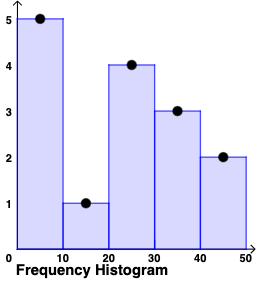
This example demonstrates how to create frequency and relative frequency histograms using GeoGebra, visually representing data distribution. Core math concepts include statistics, data grouping, frequency calculation, and relative frequency. Construction highlights from the summary involve Polygon and Dilate commands, with objects like a, b, c, etc. It's suitable for high school statistics education, aiding students in understanding histogram applications and differences.
GeoGebra Commands & Parameters
Polygon((0, 0), (10, 0), (10, y(A)), (0, y(A))) → q1, i, m, n, pPolygon((10, 0), (20, 0), (20, y(B)), (10, y(B))) → q2, q, r, s, tPolygon((20, 0), (30, 0), (30, y(C)), (20, y(C))) → q3, f_1, g_1, h_1, i_1Polygon((30, 0), (40, 0), (40, y(D)), (30, y(D))) → q4, j_1, k_1, l_1, m_1Polygon((40, 0), (50, 0), (50, y(E)), (40, y(E))) → q5, n_1, p_1, q_1, r_1Polygon((50, 0), (60, 0), (60, y(F)), (50, y(F))) → q6, s_1, t_1, b_1, c_1Polygon((60, 0), (70, 0), (70, y(G)), (60, y(G))) → q7, d_1, e_1, f_2, g_2Polygon((70, 0), (80, 0), (80, y(H)), (70, y(H))) → q8, h_2, i_2, j_2, k_2Polygon((80, 0), (90, 0), (90, y(I)), (80, y(I))) → q9, l_2, m_2, n_2, p_2Polygon((90, 0), (100, 0), (100, y(J)), (90, y(J))) → q10, q_2, r_2, s_2, t_2Dilate(A, If[0 < u_1 ≤ 1, 1 - u_1, 0], K) → A'Dilate(B, If[0 < u_1 ≤ 1, 1 - u_1, 0], L) → B'Dilate(C, If[0 < u_1 ≤ 1, 1 - u_1, 0], M) → C'Dilate(D, If[0 < u_1 ≤ 1, 1 - u_1, 0], N) → D'Dilate(E, If[0 < u_1 ≤ 1, 1 - u_1, 0], O) → E'Polygon((0, 0), (10, 0), (10, y(A')), (0, y(A'))) → q11, a_2, b_2, c_2, d_2Polygon((10, 0), (20, 0), (20, y(B')), (10, y(B'))) → q12, e_2, f_3, g_3, h_3Polygon((20, 0), (30, 0), (30, y(C')), (20, y(C'))) → q13, i_3, j_3, k_3, l_3Polygon((30, 0), (40, 0), (40, y(D')), (30, y(D'))) → q14, m_3, n_3, p_3, q_3Polygon((40, 0), (50, 0), (50, y(E')), (40, y(E'))) → q15, r_3, s_3, t_3, a_3
AI Drawing Prompt Reference
Draw a histogram with six bars, each representing a data group's frequency, with heights determined by y(A) to y(J) and evenly spaced along the x-axis from 0 to 100. Then, apply a scaling transformation to these bars to create a new histogram with heights y(A') to y(J'), also evenly spaced from 0 to 100. Display both histograms side by side to compare frequency and relative frequency.
The prompt above was compiled from the original drawing commands and is for reference only.