
Frank's Circles Problem
Loading the math board and drawing, please wait…
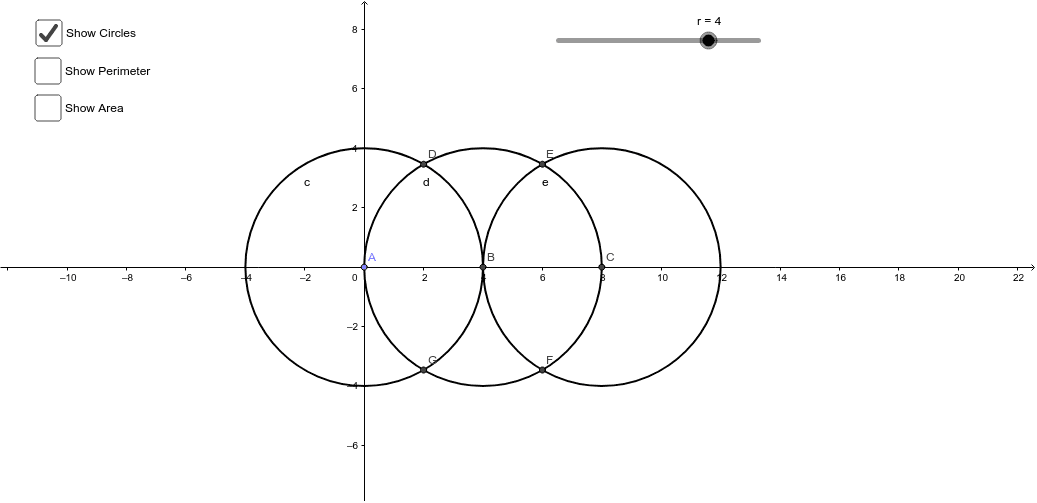
This example visually demonstrates how to compute area and perimeter for a shape formed by overlapping three circles. It involves core math concepts like circles, area, perimeter, secant lines, and geometric transformations. The construction uses GeoGebra commands such as Point, Circle, Intersect, CircleArc, Segment, Polygon, and CircleSector. Suitable for high school students learning geometric properties and calculations.
GeoGebra Commands & Parameters
Point(yAxis) → ACircle(A, r) → cIntersect(c, xAxis, 2) → BCircle(B, r) → dIntersect(d, xAxis, 2) → CCircle(C, r) → eIntersect(c, d, 1) → DIntersect(d, e, 1) → EIntersect(d, e, 2) → FIntersect(c, d, 2) → GCircleArc(A, D, G) → fCircleArc(B, G, F) → gCircleArc(C, F, E) → hCircleArc(B, E, D) → kSegment(A, D) → aPolygon(D, A, G, B) → poly1, d_1, a_1, g_1, bPolygon(E, B, F, C) → poly2, e_1, b_1, f_1, c_1CircleSector(A, D, G) → pCircleSector(B, E, D) → qCircleSector(B, G, F) → r_1CircleSector(C, F, E) → s
AI Drawing Prompt Reference
Draw three circles with the same radius that intersect each other pairwise. Connect the intersection points with arcs to form a closed shape. Draw line segments between the intersection points to create triangles. Combine arcs and triangles to display the complex figure formed by the overlapping of three circles, labeling the areas of arcs and triangles.
The prompt above was compiled from the original drawing commands and is for reference only.