
Fractions on Number Line by Austen Meek
Loading the math board and drawing, please wait…
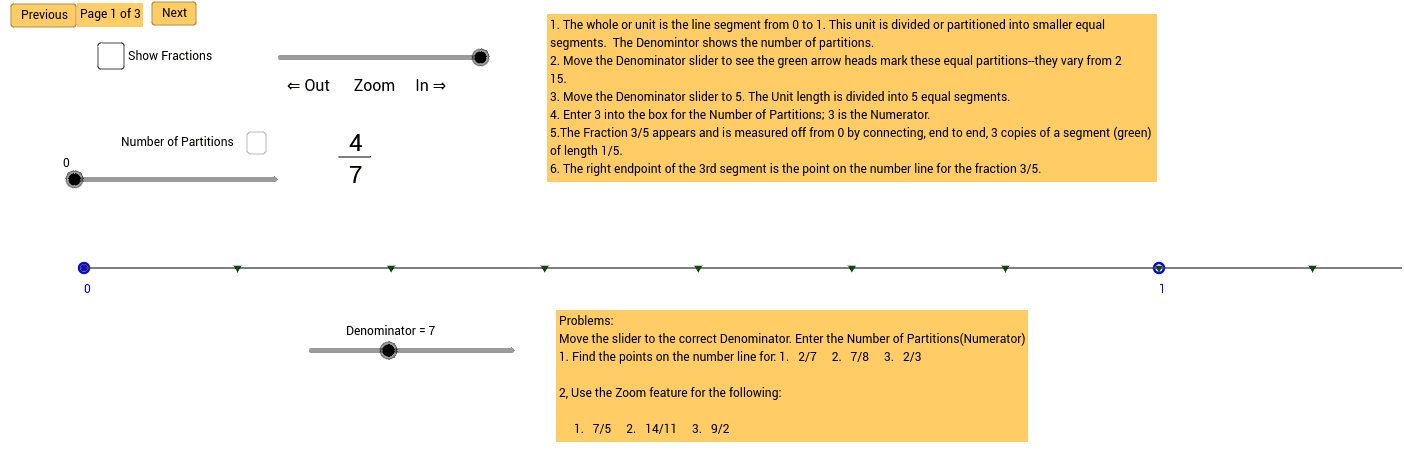
This example demonstrates how to represent fractions on a number line, including both proper and improper fractions. Key math concepts involved are fractions, number line, and geometric representation. GeoGebra commands used include Sequence, Ray, If, Point, Segment, Text, RandomElement, Textfield, and Length. It is suitable for middle school mathematics education, helping students understand the abstract concept of fractions and their representation on a number line.
GeoGebra Commands & Parameters
Sequence((x(A + (k * a)), y(A)), k, 0, 100, 1) → list1Sequence(Text[k, (x(A) + (k * a), y(A) - 0.5)], k, 0, 100, 1) → list2Ray((x(A), y(A)), (x(A) + 10, y(A))) → bSequence((x(A) + (k * a / d), y(A)), k, 1, 100, 1) → list3Sequence(Segment[(x(A) - 0.2 + (k * a / d), y(A) + 0.8), (x(A) + 0.2 + (k * a / d), y(A) + 0.8)], k, 0, 100, 1) → list7Sequence(Text[k, (x(A) + (k * a / d) - 0.05, y(A) + 0.9)], k, 0, 9, 1) → list4Sequence(Text[k, (x(A) + (k * a / d) - 0.12, y(A) + 0.9)], k, 10, 100, 1) → list6If(d < 10, Sequence[Text[d, (x(A) + (k * a / d) - 0.05, y(A) + 0.5)], k, 0, 100, 1], Sequence[Text[d, (x(A) + (k * a / d) - 0.09, y(A) + 0.5)], k, 0, 100, 1]) → list5Ray(B, (100, 0.8)) → cPoint(c) → CSegment((x(C), 1.6), C) → fText(text2, (7.5, -0.6)) → text3RandomElement(den) → denomRandomElement(num) → numerSegment(E, F) → gTextfield(c_{rtext}) → InputBox1Segment((x(A), y(A) + 0.05), (x(A) + (p * a / d), 1.75)) → jSegment(G, H) → lLength(Text[d]) → mLength(Text[k]) → o
AI Drawing Prompt Reference
Draw a number line with fraction points. On the line, mark points from 0 to 10, representing proper and improper fractions. Connect points with line segments whose lengths correspond to the fractions. Add text labels near each point, such as 1/2 and 3/4. Ensure the number line is clear, labels align with points, and segments are evenly distributed.
The prompt above was compiled from the original drawing commands and is for reference only.