
Fraction Number Line Addition Demo
Loading the math board and drawing, please wait…
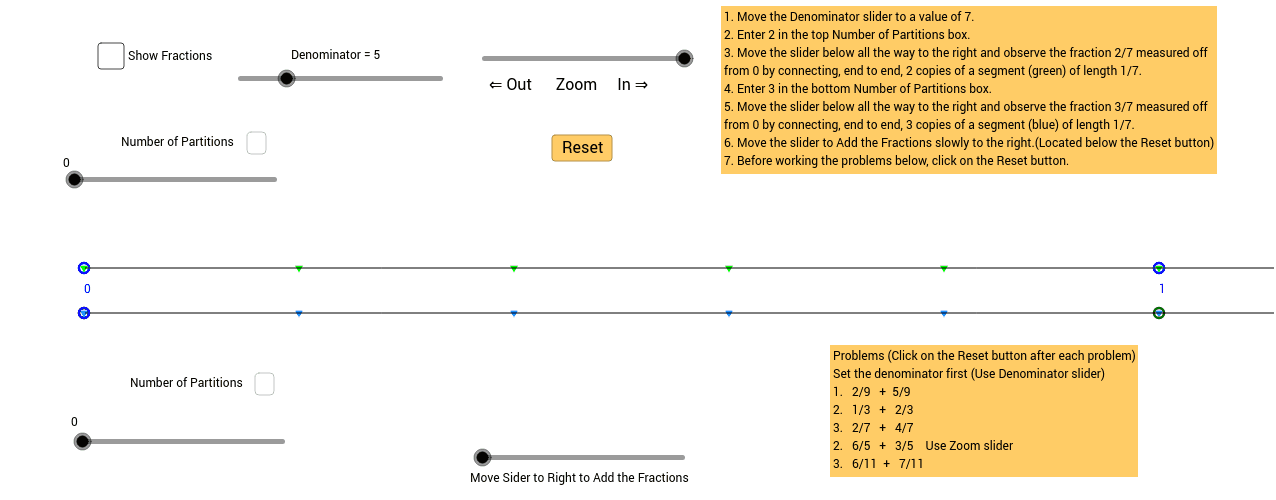
This example demonstrates how to add fractions on a number line using a graphical model, which is identical to the method for adding whole numbers. The core math concepts involved include fractions, number line, and addition operations. It is constructed using GeoGebra commands and objects such as Sequence, Ray, If, Text, RandomElement, Textfield, Segment, Length, Vector, and Translate. Suitable for middle school mathematics teaching to help students visually understand the geometric meaning of fraction addition.
GeoGebra Commands & Parameters
Sequence((x(A + (k * a)), y(A)), k, 0, 100, 1) → list1Sequence(Text[k, (x(A) + (k * a), y(A) - 0.5)], k, 0, 100, 1) → list2Ray((x(A), y(A)), (x(A) + 10, y(A))) → bSequence((x(A) + (k * a / d), y(A)), k, 0, 100, 1) → list3Sequence(Segment[(x(A) - 0.2 + (k * a / d), y(A) + 0.8), (x(A) + 0.2 + (k * a / d), y(A) + 0.8)], k, 0, 100, 1) → list7Sequence(Text[k, (x(A) + (k * a / d) - 0.05, y(A) + 0.9)], k, 0, 9, 1) → list4Sequence(Text[k, (x(A) + (k * a / d) - 0.12, y(A) + 0.9)], k, 10, 100, 1) → list6If(d < 10, Sequence[Text[d, (x(A) + (k * a / d) - 0.05, y(A) + 0.5)], k, 0, 100, 1], Sequence[Text[d, (x(A) + (k * a / d) - 0.09, y(A) + 0.5)], k, 0, 100, 1]) → list5Ray(B, (100, 0.8)) → cText(text2, (7.5, -0.6)) → text3RandomElement(den) → denomRandomElement(num) → numerTextfield(c_{rtext}) → InputBox1Segment(G, H) → lLength(Text[d]) → mLength(Text[c_r]) → oTextfield(c_{r1text}) → inputBox1Segment((x(B), y(B)), (x(B) + (p_1 * a / d), y(B))) → j_1Vector((x(B), y(B)), (x(B) + (q * a / d), int + (slp * (x(A) + (q * a / d))))) → uTranslate(j_1, u) → rSegment((x(A), y(A)), (x(A) + (p * a / d), y(A))) → jSegment(I, J) → e_1Sequence((x(B) + (s * a / d), y(B)), s, 0, 100, 1) → list8Sequence((x(B + (k * a)), y(B)), k, 0, 100, 1) → list9Length(Text[c1_r]) → wLength(Text[c_r + c1_r]) → f_1Segment(K, L) → g_1Segment(M, N) → h_1Segment(O, P) → i_1
AI Drawing Prompt Reference
Draw a number line with multiple fraction marks and connecting segments to demonstrate the geometric meaning of fraction addition. Label each point with its corresponding fraction value. Start from a point on the number line and use segments and vectors to show the addition of two fractions, marking the sum on the number line. The process visually illustrates the steps and result of fraction addition, suitable for teaching.
The prompt above was compiled from the original drawing commands and is for reference only.