
Fraction Multiplication
Loading the math board and drawing, please wait…
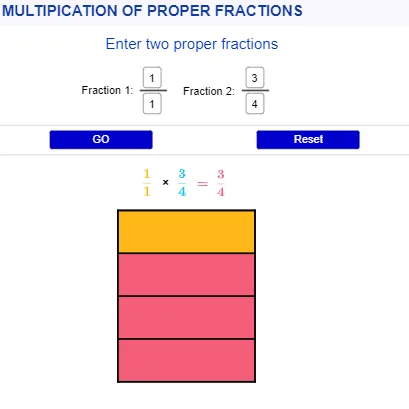
This example demonstrates the process of fraction multiplication. It involves core mathematical concepts such as basic fraction operations. Using GeoGebra commands like Textfield, Point, Polygon, Sequence, Segment, etc., a geometric model of fraction multiplication can be constructed. Suitable for high-grade elementary or junior high school students to learn fraction multiplication.
GeoGebra Commands & Parameters
Textfield(n) → InputBox1Textfield(d) → InputBox2Textfield(n2) → InputBox3Textfield(d2) → InputBox4Point(Circle[A, 5]) → BPolygon(A, B, C, D) → q1, a, b, c, d_1Point(Circle[E, 5]) → FPolygon(E, F, G, H) → q2, e, f, g, hSequence(Segment[(x(A) + i, y(A)), (x(B) + i, y(B))], i, 0, 4, 4 / d) → l1Sequence(Segment[(x(F), y(F) + i), (x(G), y(G) + i)], i, 0, 5, 5 / d2) → l2Segment(B, C) → iSegment(A, D) → jSegment(G, H) → kSegment(E, F) → lTranslate(l1, Vector[A, I]) → l1'Translate(l2, Vector[F, J]) → l2'Translate(B, Vector[A, I]) → B'Translate(C, Vector[A, I]) → C'Segment(B', C') → i'Translate(A, Vector[A, I]) → A'Translate(D, Vector[A, I]) → D'Segment(A', D') → j'Translate(G, Vector[F, J]) → G'Translate(H, Vector[F, J]) → H'Segment(G', H') → k'Translate(E, Vector[F, J]) → E'Translate(F, Vector[F, J]) → F'Segment(E', F') → l'Polygon(A', A' + ((n / d * 4), 0), A' + ((4 * n / d), (5 * n2 / d2)), A' + (0, (n2 / d2 * 5))) → q5, h_1, i_1, j_1, k_1If(n ≤ d ∧ n2 ≤ d2 ∧ d ≠ 0 ∧ d2 ≠ 0 ∧ n ≠ 0 ∧ n2 ≠ 0, true, false) → uPoint(Circle[Q, 0.75]) → RSegment(Q, R) → pPoint(Circle[O, 0.75]) → PSegment(O, P) → mPolygon(A', B', B' + ((4 * n / d), 0), A' + ((4 * n / d), 0)) → q3, q, r, l_1, m_1Polygon(F', G', G' + (0, (5 * n2 / d2)), F' + (0, (5 * n2 / d2))) → q4, s, t, f_1, g_1Line(K, L) → n_1Line(M, n_1) → p_1
AI Drawing Prompt Reference
Construct a plane diagram consisting of two similar rectangular, partitioned regions that visualize fraction multiplication. First draw one quadrilateral boundary region, then subdivide it with several short segments along horizontal directions between the left and right sides. Create a second, corresponding quadrilateral region by translating the first region to a new location. In both regions, scale the partitioning so that the subdivision counts and vertical/horizontal proportions reflect two given fraction parameters (one for the first region and another for the second). After translating, redraw the key polygonal outlines at the new locations, connect the relevant translated corner points with line segments to form the main boxes, and add small decoration points on circles with short connecting segments to indicate reference elements.
The prompt above was compiled from the original drawing commands and is for reference only.