
Fraction Multiplication Example
Loading the math board and drawing, please wait…
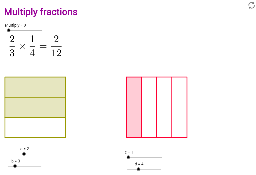
This example demonstrates the process of fraction multiplication. The core mathematical concepts involved are fraction multiplication. Construction highlights include using the Polygon command to draw polygons and the Sequence command to generate sequences. Suitable for 6th grade students learning fraction multiplication.
GeoGebra Commands & Parameters
Polygon(A, B, 4) → poly1, a_1, b_1, e, f, C, DSequence(A + (k * (D - A)), k, 0, 1, 1 / b) → L1Sequence(B + (k * (C - B)), k, 0, 1, 1 / b) → L2Sequence(Segment[Element[L1, k], Element[L2, k]], k, 2, b) → L3Polygon(D, C, S, R) → poly2, d_1, c_1, s, rPolygon(E, F, 4) → poly3, e_1, f_1, g, h, G, HSequence(H + (k * (G - H)), k, 0, 1, 1 / d) → L4Sequence(E + (k * (F - E)), k, 0, 1, 1 / d) → L5Sequence(Segment[Element[L4, k], Element[L5, k]], k, 2, d) → L6Polygon(H, U, T, E) → poly4, h_1, u, t, e_2
AI Drawing Prompt Reference
Draw a fraction multiplication example. Start by drawing a quadrilateral, then generate two line segment sequences by dividing and moving the vertices. Use these line segments to create two new quadrilaterals. Finally, draw another quadrilateral and generate two more line segment sequences to create another quadrilateral. The process illustrates the geometric representation of fraction multiplication.
The prompt above was compiled from the original drawing commands and is for reference only.