
Fraction Multiplication - Area Model
Loading the math board and drawing, please wait…
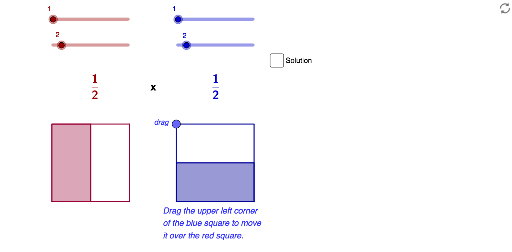
Explore the multiplication of fractions using an area model. Sliders allow users to change the denominators and verify the product. The core math concepts involved are fraction multiplication and geometric representation. GeoGebra commands and objects like Max, Sequence, Segment, Point, Element, and Polygon are used to construct the model. Suitable for middle school mathematics education to help students understand the geometric meaning of fraction multiplication.
GeoGebra Commands & Parameters
Max(Sequence[If[Mod[(a * c), i] + Mod[(b * d), i] ≟ 0, i, -1], i, 1, Min[{(a * c), (b * d)}]]) → Simplified_{GCF}Sequence(A + (t * (B - A)), t, 0, 1, 1 / b) → L1Sequence(C + (t * (D - C)), t, 0, 1, 1 / b) → L2Segment(A, B) → c_1Segment(C, D) → d_1Sequence(Segment[Element[L1, k], Element[L2, k]], k, 2, b) → L5Segment((0, 3), (4.8, 3)) → ePoint(e) → HSegment(H, E) → fSegment(E, F) → gSegment(F, G) → hSegment(G, H) → iSegment(D, B) → jSegment(C, A) → kElement(L1, a + 1) → T1Element(L2, a + 1) → T2Polygon(A, T1, T2, C) → poly1, a_1, t1, t2, c_2Sequence(E + (t * (H - E)), t, 0, 1, 1 / d) → L3Sequence(F + (t * (G - F)), t, 0, 1, 1 / d) → L4Sequence(Segment[Element[L3, k], Element[L4, k]], k, 2, d) → L6Element(L3, c + 1) → T3Element(L4, c + 1) → T4Polygon(E, F, T4, T3) → poly2, e_1, f_1, t4, t3Polygon(A, T1, (x(T1), y(T3)), T3) → solutionOutline, solutionOutlineSeg_1, solutionOutlineSeg_3, solutionOutlineSeg_2, solutionOutlineSeg
AI Drawing Prompt Reference
Draw an area model for fraction multiplication, featuring two rectangles with adjustable denominators via sliders to display the product. Connect key points with line segments to form multiple smaller rectangles, some filled, culminating in a larger product rectangle that clearly illustrates the geometric meaning of fraction multiplication.
The prompt above was compiled from the original drawing commands and is for reference only.