
Fraction Division Geometric Demonstration by IM 6 – 8 Math
Loading the math board and drawing, please wait…
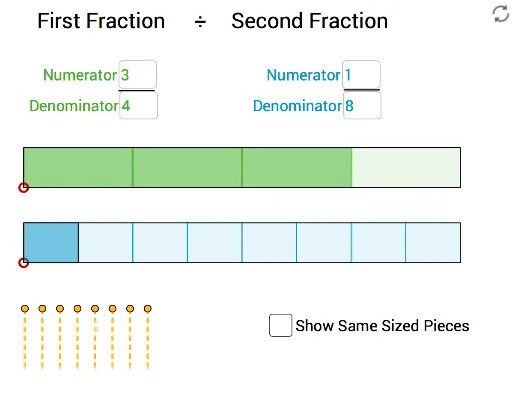
This example demonstrates how to explain the concept of fraction division through geometric figures. Key mathematical concepts include fractions and geometric transformations. It uses commands like LCM, PolyLine, Sequence, Textfield, Segment, etc. Suitable for middle school and above students to learn fraction division and geometric transformations.
GeoGebra Commands & Parameters
LCM(Bn, Rn) → PnPolyLine(B, B + (dist, 0), B + (dist, ht), B + (0, ht), B) → fSequence(Polygon[B + ((dist * (i - 1) / Bn), 0), B + ((dist * i / Bn), 0), B + ((dist * i / Bn), ht), B + ((dist * (i - 1) / Bn), ht)], i, 1, Bn) → list1Sequence(Polygon[B + ((dist * (i - 1) / Bn), 0), B + ((dist * i / Bn), 0), B + ((dist * i / Bn), ht), B + ((dist * (i - 1) / Bn), ht)], i, 1, ShG) → list2Textfield(Bn) → InputBox1Textfield(Rn) → InputBox2PolyLine(A, A + (dist, 0), A + (dist, ht), A + (0, ht), A) → rTextfield(ShG) → InputBox3Textfield(ShB) → InputBox4Segment(E_1, I_1) → f_1Segment(E_2, J_1) → g_1Segment(D_1, K_1) → h_1Segment(E_3, L_1) → i_1Segment(F_1, M_1) → j_1Segment(G_1, H_1) → k_1Segment(G_2, P_1) → l_1Segment(F_2, Q_1) → m_1Segment(E, G) → iSegment(D, F) → jfractionbar(B, Pn, 0, dist, ht) → list5, list5_2, list5_3fractionbar(C, ShB, ShB, (ShB * dist / Rn), ht) → list4, list6, gfractionbar((-7, -1), Rn, 0, dist, ht) → list3, list3_2, list3_3
AI Drawing Prompt Reference
Create a geometric figure to demonstrate the concept of fraction division. Start by drawing a rectangle, then use the LCM function and PolyLine command to draw the geometric representation of fractions. Next, use the Sequence command to draw a series of rectangles, representing geometric transformations of fractions. Finally, add text input boxes to input the numerator and denominator of the fraction, as well as the parameters for geometric transformations.
The prompt above was compiled from the original drawing commands and is for reference only.