
Fraction Bar Multiplication
Loading the math board and drawing, please wait…
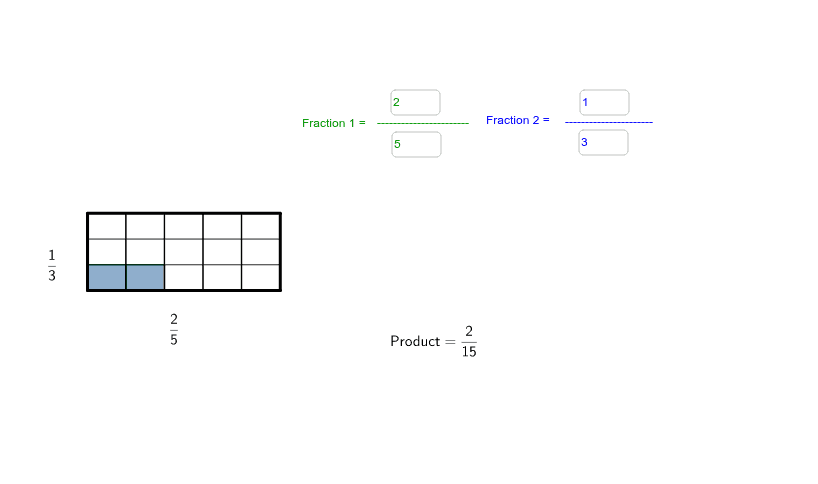
This example demonstrates fraction multiplication using a rectangular area model. It involves core math concepts like fraction multiplication, area models, improper and proper fractions. Constructed with GeoGebra commands Polygon, Textfield, Sequence, and objects such as d2, Unit, a, b, c, d. Suitable for middle school mathematics teaching to visually aid students in understanding fraction multiplication operations.
GeoGebra Commands & Parameters
Polygon({(0, -3), (5, -3), (5, -1), (0, -1)}) → Unit, a, b, c, dTextfield(n1) → inputBox1Textfield(d1) → inputBox2Textfield(n2) → inputBox3Textfield(d2) → inputBox4Sequence(Polygon[(0, i), (5 * n1 / d1, i), (5 * n1 / d1, i + step_2), (0, i + step_2)], i, -3, -3 + step_2 * (n2 - 1), step_2) → list2Polygon((0, -3), (5, -3), (5, -1), (0, -1)) → poly1, e, f, g, hSequence(Polygon[(i, -3), (i + step_1, -3), (i + step_1, -3 + step_2 * n2), (i, -3 + step_2 * n2)], i, 0, 5 * n1 / d1 - step_1, step_1) → list1Sequence(Polygon[(0, i), (Max[5 * n1 / d1, 5], i), (Max[5 * n1 / d1, 5], i + step_2), (0, i + step_2)], i, -3, Max[-3 + step_2 * (n2 - 1), -1 - step_2], step_2) → list3Sequence(Polygon[(i, -3), (i + step_1, -3), (i + step_1, Max[-3 + step_2 * n2, -1]), (i, Max[-3 + step_2 * n2, -1])], i, 0, Max[5 * n1 / d1 - step_1, 5 - step_1], step_1) → list4
AI Drawing Prompt Reference
Draw a rectangular area model to demonstrate fraction multiplication, featuring a rectangle with a base of 5 units, topped with multiple smaller rectangles, each representing a fraction with height and base length, visually showing the area relationship of fraction multiplication, arranged sequentially from bottom to top with gaps between each, ensuring the total height does not exceed -1 unit.
The prompt above was compiled from the original drawing commands and is for reference only.