
Fraction Addition
Loading the math board and drawing, please wait…
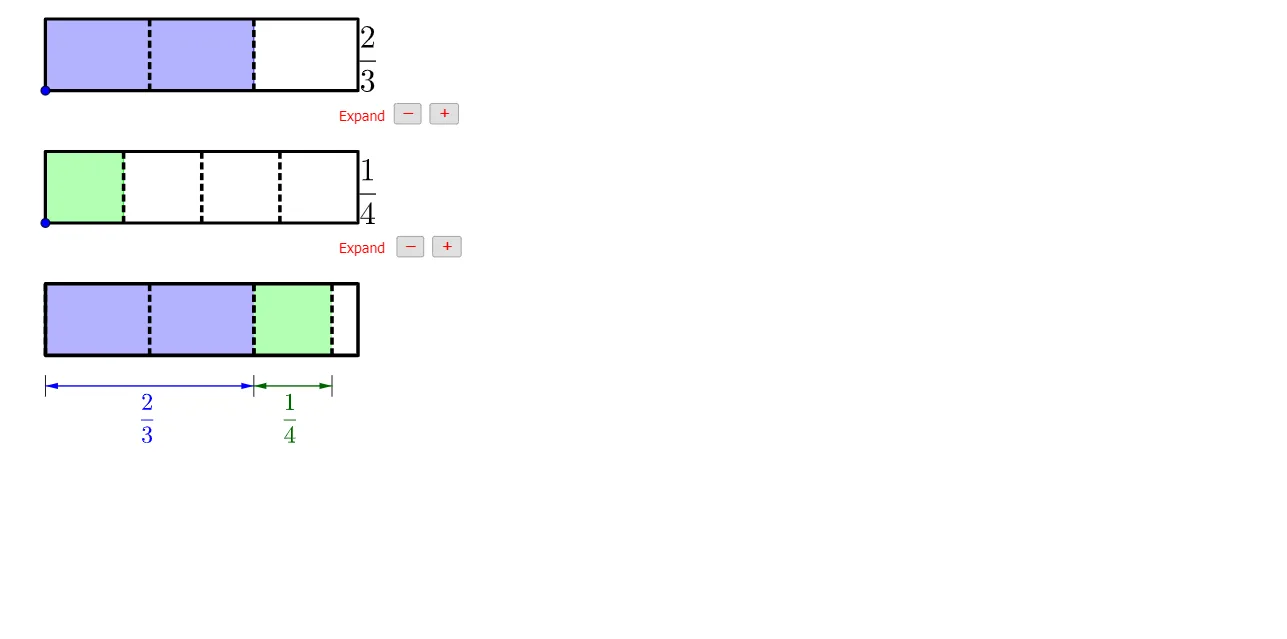
This example demonstrates the process of adding fractions. It involves key mathematical concepts such as fraction addition and geometric construction. Using GeoGebra commands like Point, Ray, Polygon, etc., it dynamically illustrates the geometric meaning of fraction addition. Suitable for high-grade elementary and junior high school students to learn fraction addition and geometric construction.
GeoGebra Commands & Parameters
Point(yAxis) → CPoint(Segment[C + (0, h), C + (0, (1.85 * h))]) → BIf(t ≤ 0.5, 0, (2 * (t - 0.5))) → t2If(t ≤ 0.5, (2 * t), 1) → t1Point(Segment[B + (0, h), B + (0, (1.85 * h))]) → ARay((0, 1.9), (0, 2.9)) → fPolygon({A, A + (l, 0), A + (l, h), A + (0, h)}) → poly1Polygon({B, B + (l, 0), B + (l, h), B + (0, h)}) → poly2Sequence(Segment[A + ((i * l / a1), 0), A + ((i * l / a1), h)], i, 1, a1 - 1) → list1Sequence(Segment[B + ((i * l / a2), 0), B + ((i * l / a2), h)], i, 1, a2 - 1) → list2Polygon({A, A + ((b1 * l / a1), 0), A + ((b1 * l / a1), h), A + (0, h)}) → poly3Polygon({B, B + ((b2 * l / a2), 0), B + ((b2 * l / a2), h), B + (0, h)}) → poly4Sequence(Sequence[Segment[A + ((i * l / a1) + (j * l / ((a1 * c1))), 0), A + ((i * l / a1) + (j * l / ((a1 * c1))), h)], j, 1, c1 - 1], i, 0, a1 - 1) → list3Sequence(Sequence[Segment[B + ((i * l / a2) + (j * l / ((a2 * c2))), 0), B + ((i * l / a2) + (j * l / ((a2 * c2))), h)], j, 1, c2 - 1], i, 0, a2 - 1) → list4If(a1 ≟ a2, true, false) → equaldIf(equald ∧ (Div[b1 + b2, a1] > 0 ∨ GCD[b1 + b2, a1] > 1), true, If[Div[(b1 * c1) + (b2 * c2), (a1 * c1)] > 0 ∨ GCD[(b1 * c1) + (b2 * c2), (a1 * c1)] > 1, true, false]) → simplifyTextfield(a1) → InputBox1Textfield(b1) → InputBox2Textfield(a2) → InputBox3Textfield(b2) → InputBox4Polygon({A', A' + (l, 0), A' + (l, h), A' + (0, h)}) → poly5Polygon({B', B' + ((b2 / a2 * l), 0), B' + ((b2 / a2 * l), h), B' + (0, h)}) → poly6Polygon({A', A' + ((b1 * l / a1), 0), A' + ((b1 * l / a1), h), A' + (0, h)}) → poly7Polygon({B', B' + ((b2 * l / a2), 0), B' + ((b2 * l / a2), h), B' + (0, h)}) → poly8Sequence(Sequence[Segment[A' + ((i * l / a1) + (j * l / ((a1 * c1))), 0), A' + ((i * l / a1) + (j * l / ((a1 * c1))), h)], j, 1, c1 - 1], i, 0, b1 - 1) → list8Sequence(Sequence[Segment[B' + ((i * l / a2) + (j * l / ((a2 * c2))), 0), B' + ((i * l / a2) + (j * l / ((a2 * c2))), h)], j, 1, c2 - 1], i, 0, b2 - 1) → list9Segment(C - (0, 0.5), C - (0, 1)) → gSegment(C + ((b1 / a1 * l), -0.5), C + ((b1 / a1 * l), -1)) → iSegment(C + ((b1 / a1 * l) + (b2 / a2 * l), -0.5), C + ((b1 / a1 * l) + (b2 / a2 * l), -1)) → jVector(Midpoint[g], Midpoint[i]) → uVector(Midpoint[i], Midpoint[g]) → vVector(Midpoint[i], Midpoint[j]) → wVector(Midpoint[j], Midpoint[i]) → aSequence(Segment[A' + ((i * l / a1), 0), A' + ((i * l / a1), h)], i, 0, b1) → list6Sequence(Segment[B' + ((i * l / a2), 0), B' + ((i * l / a2), h)], i, 0, b2) → list7Sequence(Polygon[{C + ((i * l), 0), C + ((i * l) + l, 0), C + ((i * l) + l, h), C + ((i * l), h)}], i, 1, floor(b1 / a1 + b2 / a2)) → list5Segment(B', B' + ((b2 / a2 * l), 0)) → kSegment(B' + ((b2 / a2 * l), h), B' + (0, h)) → mIf(b1 / a1 + b2 / a2 ≥ 1, true, false) → improperFractionText(b1 / a1 + b2 / a2) → text19FractionText(b1 / a1 + b2 / a2 - 1) → text20Sequence(Sequence[Segment[C + ((i * l / ((a1 * c1))) + (j * l), 0), C + ((i * l / ((a1 * c1))) + (j * l), h)], i, 1, (a1 * c1) - 1], j, 0, If[b1 / a1 + b2 / a2 ≤ 1, 0, 1]) → list10
AI Drawing Prompt Reference
Draw the process of adding two fractions. Start by creating point C on the y-axis and point B above C. Then draw the geometric representation of two fractions, including rectangles poly1 and poly2, and their numerators and denominators. Use sequence commands to draw the result of adding the fractions, including poly3 and poly4. Finally, show the addition result through a series of segments and rectangles, including possible improper fractions and the final fraction result text19.
The prompt above was compiled from the original drawing commands and is for reference only.