
Fraction Addition Demonstration by Auston B Cron (2)
Loading the math board and drawing, please wait…
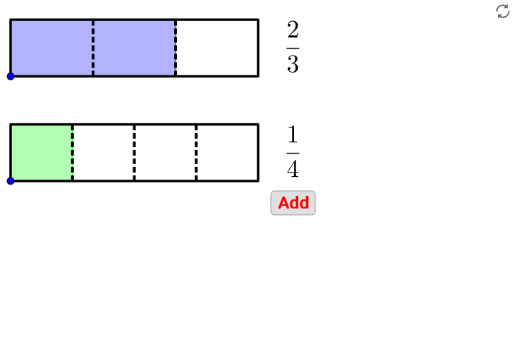
This example demonstrates the geometric representation and addition of fractions. It involves core mathematical concepts such as fraction operations, geometric figure construction, vectors, and polygons. GeoGebra commands and objects like Point, If, Ray, Polygon, Sequence, Textfield, Segment, Vector, FractionText are utilized in the construction. Suitable for middle school and above, it aids in visualizing fraction addition and geometric applications.
GeoGebra Commands & Parameters
Point(yAxis) → CPoint(Segment[C + (0, h), C + (0, (1.85 * h))]) → BIf(t ≤ 0.5, 0, (2 * (t - 0.5))) → t2If(t ≤ 0.5, (2 * t), 1) → t1Point(Segment[B + (0, h), B + (0, (1.85 * h))]) → ARay((0, 1.9), (0, 2.9)) → fPolygon({A, A + (l, 0), A + (l, h), A + (0, h)}) → poly1Polygon({B, B + (l, 0), B + (l, h), B + (0, h)}) → poly2Sequence(Segment[A + ((i * l / a1), 0), A + ((i * l / a1), h)], i, 1, a1 - 1) → list1Sequence(Segment[B + ((i * l / a2), 0), B + ((i * l / a2), h)], i, 1, a2 - 1) → list2Polygon({A, A + ((b1 * l / a1), 0), A + ((b1 * l / a1), h), A + (0, h)}) → poly3Polygon({B, B + ((b2 * l / a2), 0), B + ((b2 * l / a2), h), B + (0, h)}) → poly4Sequence(Sequence[Segment[A + ((i * l / a1) + (j * l / ((a1 * c1))), 0), A + ((i * l / a1) + (j * l / ((a1 * c1))), h)], j, 1, c1 - 1], i, 0, a1 - 1) → list3Sequence(Sequence[Segment[B + ((i * l / a2) + (j * l / ((a2 * c2))), 0), B + ((i * l / a2) + (j * l / ((a2 * c2))), h)], j, 1, c2 - 1], i, 0, a2 - 1) → list4If(a1 ≟ a2, true, false) → equaldIf(equald ∧ ((Div[b1 + b2, a1] > 0) ∨ (GCD[b1 + b2, a1] > 1)), true, If[(Div[(b1 * c1) + (b2 * c2), (a1 * c1)] > 0) ∨ (GCD[(b1 * c1) + (b2 * c2), (a1 * c1)] > 1), true, false]) → simplifyTextfield(a1) → InputBox1Textfield(b1) → InputBox2Textfield(a2) → InputBox3Textfield(b2) → InputBox4Polygon({A', A' + (l, 0), A' + (l, h), A' + (0, h)}) → poly5Polygon({B', B' + ((b2 / a2 * l), 0), B' + ((b2 / a2 * l), h), B' + (0, h)}) → poly6Polygon({A', A' + ((b1 * l / a1), 0), A' + ((b1 * l / a1), h), A' + (0, h)}) → poly7Polygon({B', B' + ((b2 * l / a2), 0), B' + ((b2 * l / a2), h), B' + (0, h)}) → poly8Sequence(Sequence[Segment[A' + ((i * l / a1) + (j * l / ((a1 * c1))), 0), A' + ((i * l / a1) + (j * l / ((a1 * c1))), h)], j, 1, c1 - 1], i, 0, b1 - 1) → list8Sequence(Sequence[Segment[B' + ((i * l / a2) + (j * l / ((a2 * c2))), 0), B' + ((i * l / a2) + (j * l / ((a2 * c2))), h)], j, 1, c2 - 1], i, 0, b2 - 1) → list9Segment(C - (0, 0.5), C - (0, 1)) → gSegment(C + ((b1 / a1 * l), -0.5), C + ((b1 / a1 * l), -1)) → iSegment(C + ((b1 / a1 * l) + (b2 / a2 * l), -0.5), C + ((b1 / a1 * l) + (b2 / a2 * l), -1)) → jVector(Midpoint[g], Midpoint[i]) → uVector(Midpoint[i], Midpoint[g]) → vVector(Midpoint[i], Midpoint[j]) → wVector(Midpoint[j], Midpoint[i]) → aSequence(Segment[A' + ((i * l / a1), 0), A' + ((i * l / a1), h)], i, 0, b1) → list6Sequence(Segment[B' + ((i * l / a2), 0), B' + ((i * l / a2), h)], i, 0, b2) → list7Sequence(Polygon[{C + ((i * l), 0), C + ((i * l) + l, 0), C + ((i * l) + l, h), C + ((i * l), h)}], i, 1, floor(b1 / a1 + b2 / a2)) → list5Segment(B', B' + ((b2 / a2 * l), 0)) → kSegment(B' + ((b2 / a2 * l), h), B' + (0, h)) → mIf(b1 / a1 + b2 / a2 ≥ 1, true, false) → improperFractionText(b1 / a1 + b2 / a2) → text19FractionText(b1 / a1 + b2 / a2 - 1) → text20Sequence(Sequence[Segment[C + ((i * l / ((a1 * c1))) + (j * l), 0), C + ((i * l / ((a1 * c1))) + (j * l), h)], i, 1, (a1 * c1) - 1], j, 0, If[b1 / a1 + b2 / a2 ≤ 1, 0, 1]) → list10
AI Drawing Prompt Reference
Draw a geometric representation of fraction addition. Start by creating point C on the y-axis, then create point B above C. Construct two equal-length segments starting from B and C, respectively, and extend them upwards. Use these points and segments to construct two parallelograms representing the geometric representation of fractions. Then, input the numerators and denominators through input boxes to construct multiple small rectangles representing the addition of fractions. Finally, calculate and construct the result of the fraction addition, and use arrows to represent vectors.
The prompt above was compiled from the original drawing commands and is for reference only.