
Fraction Addition Demo by Hector Vasquez
Loading the math board and drawing, please wait…
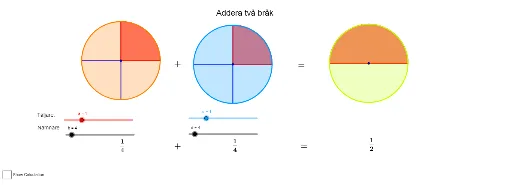
This example visually demonstrates the process of adding fractions, involving core math concepts like fraction arithmetic, GCD, and polynomial functions. It uses GeoGebra commands such as pie and GCD, along with objects like A, B, b, a, etc. Ideal for middle school and above learners to understand fraction addition principles and polynomial function applications.
GeoGebra Commands & Parameters
pie(A, b, a) → c_1, list1, list2pie(B, d, c) → f, list3, list4GCD(e, g) → hpie(C, j, i) → k, list5, list6
AI Drawing Prompt Reference
Create a visual demonstration of fraction addition: draw two pie charts representing the two fractions, compute the greatest common divisor of their denominators to find a common denominator, and then show a third pie chart illustrating the sum of the fractions, clearly depicting the step‑by‑step addition process. Include labels for each sector, show the calculation of the greatest common divisor, and display the resulting fraction in its simplest form.
The prompt above was compiled from the original drawing commands and is for reference only.