
Fraction Addition Demo by bally
Loading the math board and drawing, please wait…
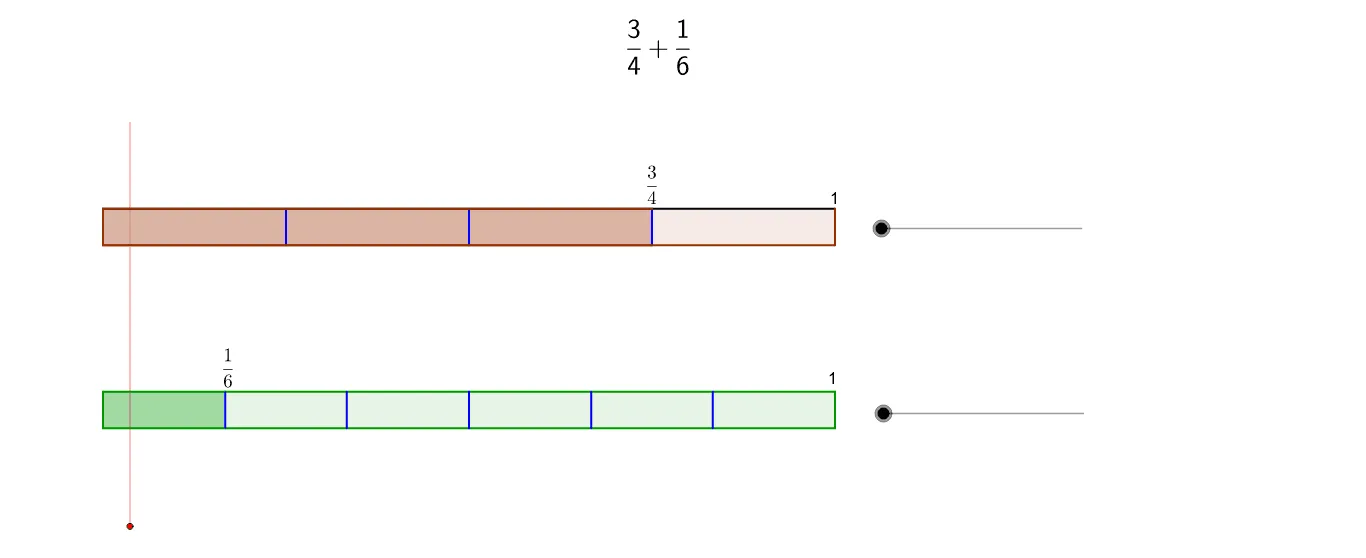
This example demonstrates the geometric intuition of adding fractions with unlike denominators. It involves core math concepts like fraction addition, handling different denominators, and geometric figure construction. The construction uses commands such as Polygon, Segment, Point, and OrthogonalLine. Suitable for middle school mathematics teaching to help students understand the essence and geometric representation of fraction addition.
GeoGebra Commands & Parameters
Polygon(A, B, C, D) → poly1, a, b, c, dSegment(E, F) → eSegment(G, H) → gSegment(I, J) → hSegment(K, L) → iSegment(M, N) → jSegment(O, P) → kSegment(Q, R) → lPolygon(A_2, B_2, C_2, D_2) → poly2, a_2, b_2, c_2, d_2Segment(E_2, F_2) → f_1Segment(G_2, H_2) → g_1Segment(J_2, K_2) → h_1Segment(L_2, M_2) → i_1Segment(N_2, O_2) → j_1Segment(P_2, Q_2) → k_1Segment(R_2, S_2) → l_1Segment(T_2, U_2) → m_1Segment(V_2, W_2) → n_1Segment(Z_2, A_3) → r_1Segment(B_3, C_3) → s_1Segment(D_3, E_3) → t_1Segment(F_3, G_3) → e_2Segment(H_3, I_3) → f_2Segment(J_3, K_3) → g_2Segment(L_3, M_3) → h_2Segment(N_3, O_3) → i_2Segment(K_5, L_5) → mSegment(M_5, N_5) → nSegment(O_5, P_5) → pPoint(yAxis) → S_1OrthogonalLine(S_1, yAxis) → qPoint(q) → T_1OrthogonalLine(T_1, q) → rPoint(r) → U_1Segment(U_1, T_1) → sSegment(Q_5, R_5) → tSegment(S_5, T_5) → a_1Segment(U_5, V_5) → b_1Segment(W_5, Z_5) → c_1Segment(A_6, B_6) → d_1Polygon(A_2, J_2, K_2, D_2) → poly3, a_3, j_2, k_2, d_3Polygon(A, I, J, D) → poly4, a_4, i_3, j_3, d_4Segment(C_6, D_6) → e_1Segment(E_6, F_6) → l_2Segment(G_6, H_6) → m_2Segment(I_6, J_6) → n_2Segment(K_6, L_6) → r_2Segment(M_6, N_6) → s_2Segment(O_6, P_6) → t_2Segment(Q_6, R_6) → b_3Segment(S_6, T_6) → c_3Segment(U_6, V_6) → e_3Segment(W_6, Z_6) → f_3Segment(A_7, B_7) → g_3Segment(C_7, D_7) → h_3Segment(E_7, F_7) → k_3Segment(G_7, H_7) → l_3Segment(I_7, J_7) → m_3Segment(K_7, L_7) → n_3Segment(M_7, N_7) → q_3Segment(O_7, P_7) → r_3Segment(Q_7, R_7) → s_3Segment(S_7, T_7) → t_3Segment(U_7, V_7) → b_4Segment(W_7, Z_7) → c_4Segment(A_8, B_8) → e_4Segment(C_8, D_8) → f_4Segment(E_8, F_8) → g_4Segment(G_8, H_8) → h_4Segment(I_8, J_8) → i_4Segment(K_8, L_8) → j_4Segment(M_8, N_8) → k_4Segment(O_8, P_8) → l_4Segment(Q_8, R_8) → m_4Segment(S_8, T_8) → n_4Segment(U_8, V_8) → p_4Segment(W_8, Z_8) → q_4Segment(A_9, B_9) → r_4Segment(C_9, D_9) → s_4Segment(E_9, F_9) → t_4Segment(G_9, H_9) → a_5Segment(I_9, J_9) → b_5Segment(K_9, L_9) → c_5Segment(M_9, N_9) → d_5Segment(O_9, P_9) → e_5Segment(Q_9, R_9) → f_5Segment(S_9, T_9) → g_5Segment(U_9, V_9) → h_5Segment(W_9, Z_9) → i_5Segment(A_10, A_11) → j_5Segment(C_11, D_11) → k_5Segment(E_11, F_11) → l_5
AI Drawing Prompt Reference
Create a geometric illustration demonstrating the intuitive understanding of adding fractions with unlike denominators. Construct two polygons to represent fractions and use segments and orthogonal lines to build auxiliary shapes, combining them into a complete geometric model that clearly shows the essence of fraction addition.
The prompt above was compiled from the original drawing commands and is for reference only.